

A pre authorization of credit card is really just a temporary hold placed on a customer's funds. It isn't an actual charge, but it’s a smart way for your business to check that the card is legit and has enough money available for a potential purchase.
What a Pre Authorization Really Means
Ever checked into a hotel or rented a car and later spotted a “pending” charge on your credit card statement? That’s a pre authorization in action.
Think of it like making a reservation for money. Your business isn’t taking the cash just yet, but you are setting it aside to guarantee it’s there when the final bill is ready.
This process is a crucial security step, especially for businesses where the final transaction amount isn't known right away. It protects you from the risk of a customer not having enough funds to cover the final cost.
How Is It Different From a Real Charge?
The main difference comes down to a temporary hold versus a final payment. A pre authorization simply reduces the customer’s available credit for a short time. A final charge, often called a capture, is the real deal—it actually moves the money from the customer’s account to yours.
This distinction is key to how payment processing works. To make it crystal clear, let's break down how these two actions stack up.
Pre Authorization Hold vs Final Charge
This table offers a quick comparison, highlighting the key differences between a temporary authorization hold and a finalized credit card charge.
As you can see, an auth is the "are you good for it?" check, while a capture is the "okay, time to pay up" moment.
Why This Matters in a Growing Market
Getting a handle on pre authorizations is more important now than ever. With the number of US credit card accounts projected to hit a record 631.39 million by Q1 2025, making sure every step of the payment journey is smooth is vital for both merchants and shoppers.
This huge volume just goes to show how a good authorization process leads to better customer experiences and more secure transactions for everyone involved.
At its core, a pre authorization on a credit card is handled by your payment processor. It acts as the messenger between your business, the customer's bank, and the credit card network. Want to dive deeper into that relationship? Check out our guide on what a payment processor does to see the full picture.
How The Pre-Authorization Process Works
So, what’s really going on behind the scenes during a pre-authorization? Think of it as a lightning-fast, secure conversation happening between your store, your customer's bank, and the card network (like Visa or Mastercard). It all happens in the blink of an eye.
Let's say a customer is about to buy a custom-made jacket from your online store. When they hit "Place Order," you don't actually take their money right away. Instead, your payment system pings their bank with a simple question: "Does this person have enough available credit to cover a $200 purchase?"
The Automated Verification Steps
The customer's bank gets this request and immediately runs a series of automated checks. This isn't some person in a back room looking things up; it's a smart system confirming several key details to block fraud and make sure the transaction is legit.
In those few seconds, the bank verifies:
- Card Number: Is the account number valid and active?
- Expiration Date: Is the card still good?
- CVV Code: Does that three or four-digit security code match what’s on file?
- Available Funds: Is there enough credit to cover the amount?
If everything looks good, the bank sends a message back saying, "Yep, the funds are available." It then places a temporary hold on that $200. This reduces the customer's available credit, but no money has actually moved yet. Your store gets the green light, and the customer sees a successful order confirmation on their screen.
This diagram breaks down the two key stages perfectly—from the initial hold to the final payment capture.
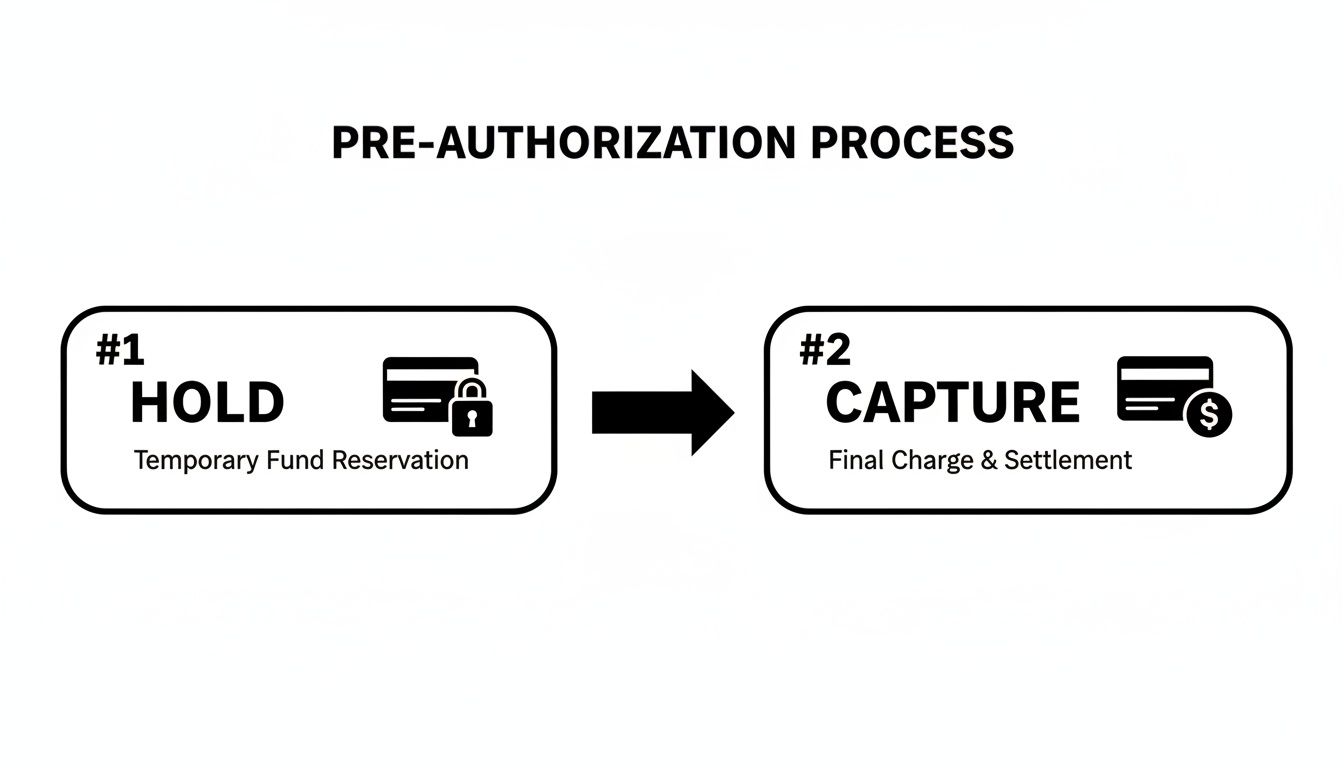
As you can see, the hold is just a reservation. The capture is when the money actually changes hands.
The Impact of Strong Security
This whole verification dance is more than just a technical step—it has a real impact on your bottom line. Stronger security checks during authorization actually lead to higher approval rates. The major card networks have seen this play out globally when authentication is handled correctly.
For instance, Visa sees a 4.6% lift in authorization rates with better authentication, while Mastercard gets 3-6 percentage points higher approvals. For a business with $50 million in recurring revenue, even a small lift can mean recovering millions in otherwise lost transactions. You can discover more insights about payment trust and its financial impact.
These security layers, like address verification and other advanced protocols, are essential. They build trust in the entire system for everyone involved. To get a better handle on these advanced security measures, it’s worth learning more about what 3-D Secure authentication is and how it adds another critical layer of protection to online payments.
Why Certain Businesses Depend On Pre-Authorization
For some businesses, a pre-authorization of credit card isn't just a handy tool—it's the backbone of their payment process. It works like a financial safety net, especially when the final bill is up in the air or there's a real risk of extra charges popping up after the initial sale.

Just think about the travel and hospitality world. When a guest checks into a hotel, nobody knows the final cost yet. They might grab a snack from the minibar, order room service, or accidentally break something. A pre-authorization hold makes sure the hotel has access to funds to cover these "just in case" costs, so they aren't left chasing payment after the guest is long gone.
Securing Against Unknowns in Rentals and Services
This same idea is crucial for any rental business. A car rental company, for instance, will place a hold for more than the expected rental fee. That temporary hold is their backup plan to cover potential extras like refueling charges if the tank isn't full, late return fees, or dings and scratches on the vehicle.
Without that hold, the company would be taking on a huge financial risk every time a car drove off the lot. It’s a smart, proactive way to guarantee they get paid for the full value of their service. Gas stations do the same thing when you pay at the pump. They’ll pre-authorize a round number, like $100, before you even start fueling, then capture only the exact amount you actually pumped.
This method of locking in payment upfront is absolutely essential for risk management. It prevents the all-too-common headache of non-payment for services already delivered, which can spiral into messy and often fruitless collection efforts.
For businesses deep in the travel sector, getting these transactions right is a big deal. You can dive deeper into effective chargeback management in travel to better protect your revenue stream.
Managing Inventory and Custom Orders
But pre-authorization isn't just for services with surprise costs. It’s also a lifesaver for e-commerce stores that sell custom, made-to-order products or have longer lead times before shipping. By authorizing a card when the order is placed but only capturing the funds upon shipment, merchants sidestep a few major headaches:
- Refunding Out-of-Stock Items: You avoid the awkward situation of charging a customer for something that, it turns out, you can't ship. This saves you the operational cost and hassle of processing a refund.
- Improving Customer Trust: People really appreciate not having their money taken until their order is actually heading their way. It just feels fairer.
- Managing Cash Flow: You don't have to sit on a customer's money while you're still in the process of building or sourcing their product.
To show just how widespread this practice is, here’s a look at how different industries put pre-authorization to work.
Common Pre-Authorization Use Cases by Industry
This table highlights how various sectors use pre-authorization holds to manage financial risk and keep their operations running smoothly.
As you can see, the application is tailored to the specific risks and transaction cycles of each business type.
Ultimately, countless businesses rely on pre-authorization as a core part of their strategies for revenue optimization and risk management. It offers the flexibility needed to handle complex sales while shielding the business from preventable losses.
Managing Authorization Holds and Expiration Timelines
One of the biggest questions merchants have about the pre authorization of credit card transactions is pretty simple: how long does this hold actually last?
The answer, however, isn't up to you. The duration of an authorization hold is decided entirely by the customer's issuing bank and the card network (think Visa or American Express). As the merchant, you have zero control over this timeline. Understanding this detail is crucial for managing your order fulfillment and when you actually capture the payment.
How Long Do Pre-Authorization Holds Last?
While there’s no single, universal rule, these holds generally follow a predictable pattern based on the card and transaction type.
- Debit Cards: Holds are usually shorter, often lasting just 1-5 business days.
- Credit Cards: You can expect a longer window here, typically anywhere from 5-7 days for standard purchases.
- Special Cases: For businesses like hotels or car rentals that need to account for incidentals, holds can stretch for up to 30 days.
This variation gives merchants in different industries enough breathing room to finalize charges that might change. For a typical e-commerce store, though, it's safe to think in terms of a one-week window.
It's crucial to remember that a pre-authorization hold temporarily reduces a customer's available credit. This is a common point of confusion—customers often see it as a "pending charge" and worry they've been billed twice.
What Happens When a Hold Expires?
This is where things can get tricky. If you don't capture the payment before the authorization expires, the hold is automatically released by the customer’s bank. The funds go right back to their available balance, and your authorization code becomes useless.
When that happens, you lose your guaranteed claim to that money. Your only option is to contact the customer and ask them to place the entire order again. It's a frustrating experience for them and a huge headache for you, often leading to a lost sale because most people won't bother going through checkout a second time.
That's why timing your captures correctly is so important. For online stores, a great rule of thumb is to capture the funds only when the order is shipped. This perfectly aligns the real charge with the fulfillment action, keeping you well within the authorization window and building trust with your customer. By doing this, you dodge the risk of expired holds and make sure you get paid for every single order you send out the door.
How to Set Up Pre-Authorization in Your Store
Putting a pre-authorization of credit card system into practice is much easier than it sounds. You don’t need to be a developer or write a single line of code to get this going. Most major e-commerce platforms have this functionality built right into their settings, ready for you to flip a switch.
The key is changing your payment capture setting from “automatic” to “manual.” By default, most stores are set to automatic, which means the customer’s card is charged the instant they click "buy." Switching to manual capture puts you in the driver's seat, letting you authorize the card first and grab the funds later—like when you're actually ready to ship the product.
Setting Up Manual Capture on Shopify
If you're on Shopify, this change takes less than a minute. Seriously. Just follow these simple steps:
- From your Shopify admin dashboard, head over to Settings.
- Click on Payments.
- Look for the "Payment capture" section and select Manually capture payment for orders.
- Hit Save.
And that’s it. Now, when a new order comes in, its payment status will show as "Authorized." You'll then need to go into the order page and manually click "Capture payment" to process the charge.
How Stripe Handles Two-Step Payments
Stripe also makes this a breeze by separating the process into two distinct steps: authorization and capture. When you create what they call a "payment intent," you can simply tell it to authorize the funds without immediately capturing them.
The screenshot below from Stripe's own documentation shows you exactly how to enable this feature, giving you the power to capture the payment on your own timeline.
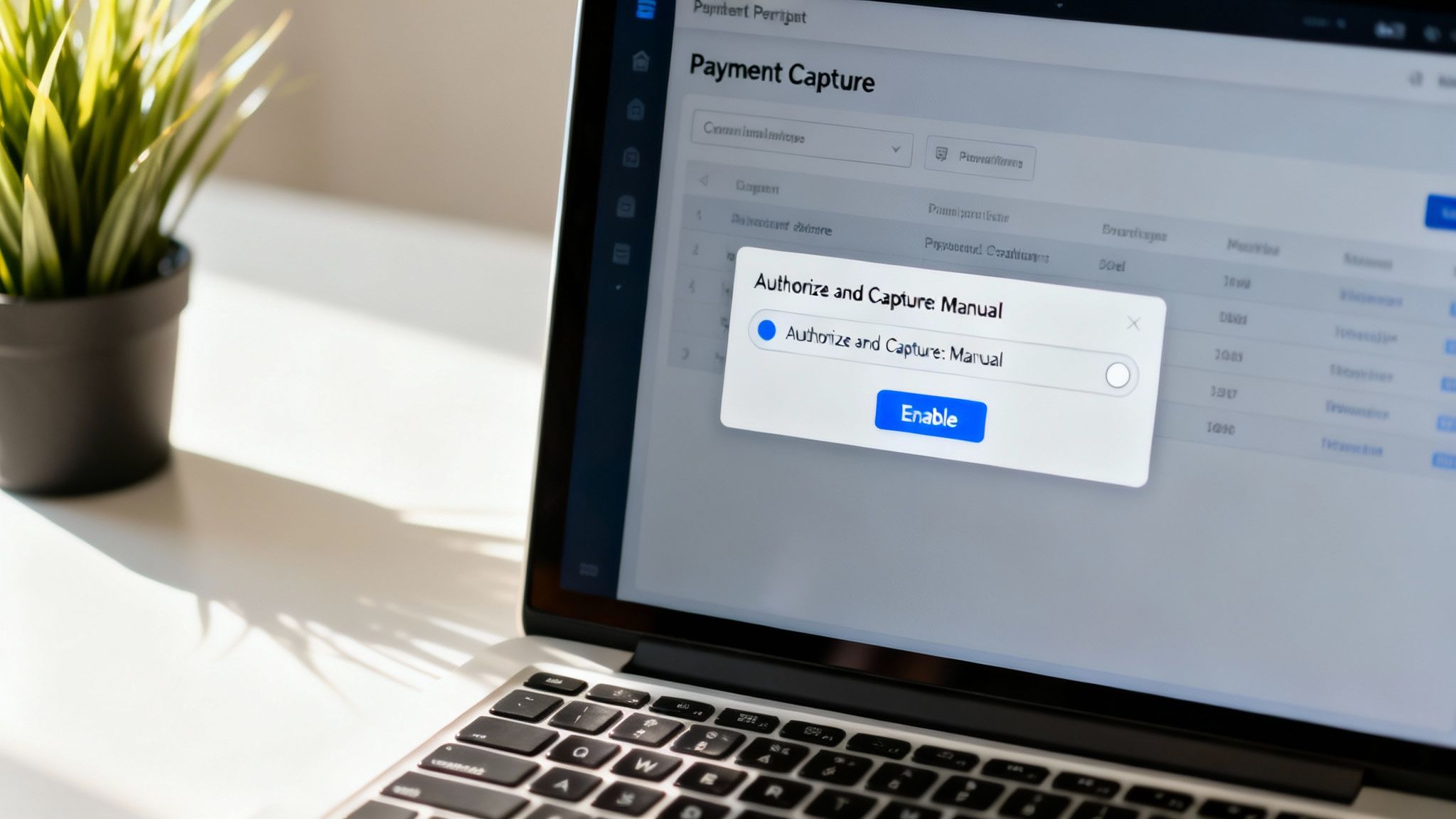
This kind of setup is perfect for businesses that need a moment to confirm inventory levels or prepare a custom order before finalizing the transaction. It ensures the funds are reserved without charging the customer prematurely.
This two-step process is also a fantastic risk management tool. Card issuers rely heavily on risk assessments to approve transactions. For example, applicants with top-tier credit scores saw an 86% approval rate, while those in the deep subprime category had only a 20% approval rate. Authorizing first lets you confirm that the bank has given the green light before you commit to fulfilling the sale.
Activating manual capture is a simple but powerful way to align your payment workflow with your actual fulfillment process. For more tips on fine-tuning your payment experience, check out our guide on creating a seamless checkout process.
Best Practices for Using Pre-Authorization
Using a pre-authorization of credit card transactions is a savvy move, but getting it wrong can frustrate customers and pile on unnecessary work. The whole point is to make your payment process smoother, not a tangled mess. Sticking to a few simple guidelines will ensure you’re building trust while protecting your business.
The golden rule here is transparency. Always, always communicate your hold policies clearly at the checkout. A simple note explaining that you authorize cards when an order is placed but only charge when it ships can prevent a ton of customer confusion and panicked calls to your support team.
Communicate Clearly and Capture Promptly
Clear communication sets expectations right from the start and dials down customer anxiety. When someone sees a pending hold on their account, they'll remember your policy and won't immediately assume it's a mistaken charge. This one small step can slash your support tickets.
Next up is timing. You have to be strategic. The second you ship an order, capture that payment. If you wait too long, you risk the authorization expiring. That means the hold on the funds vanishes, and you’re left having to awkwardly ask the customer to pay again—a scenario that almost always ends in a lost sale.
Here are a few actionable best practices to get you started:
- Authorize the Expected Amount: Only place a hold for the amount you actually plan to charge. Authorizing an inflated amount can max out a customer’s card, leading to declines on their other purchases and a very unhappy camper.
- Release Holds You Don't Need: If an order gets canceled, void the authorization immediately. This frees up the customer's funds right away, which shows good faith and leaves a positive impression even if you didn't make a sale.
- Monitor Your Payment Statuses: Keep a close watch on any orders sitting in an "Authorized" state. You need a solid workflow to make sure no order ever leaves your warehouse without its payment being captured first.
Putting these practices into play does more than just streamline your workflow. It has a direct impact on customer trust and seriously cuts down on the likelihood of payment disputes. A transparent, efficient process is one of your best tools for proactive chargeback prevention.
By being upfront about your process and efficient in your operations, you turn the pre-authorization of a credit card from a simple technical step into a powerful tool for building customer confidence. For a deeper dive into protecting your revenue, explore our comprehensive guide on effective chargeback prevention.
Common Questions About Pre Authorization
Even with a solid grasp of the process, a few specific questions about pre authorization of credit card transactions always seem to pop up. It's easy for both merchants and customers to get tripped up by the details. Let's tackle the most common points of confusion with some quick, straightforward answers.
Is a Pre Authorization the Same as a Pending Charge?
They can look nearly identical on a bank statement, which is where the confusion starts, but they serve very different purposes. A pre authorization is simply a temporary hold to confirm that the funds are available. It often shows up as a "pending charge" on a customer's account statement.
The real difference lies in what happens next. A pre authorization will simply disappear if the merchant doesn’t capture the funds in time. A true pending charge, on the other hand, is the first step of a transaction that's already in motion and will eventually finalize and post to the account.
Can the Final Charge Be Different From the Authorized Amount?
Absolutely, and this flexibility is one of the main reasons businesses use pre-auths in the first place. For certain industries, it's not just helpful—it's essential.
- Restaurants: A restaurant might authorize the cost of the meal, then capture a slightly higher final amount after the customer adds a tip.
- Gas Stations: When you pay at the pump, the station often authorizes a set amount, like $75, but will only capture the exact cost of the gas you actually pumped into your tank.
Card networks have specific rules about how much the final charge can differ from the initial hold, but some variation is both expected and allowed.
What Happens if a Pre Authorization Expires?
If an authorization expires before you capture the payment, the hold on the customer's card is released. The moment that happens, you lose your ability to collect those funds using that specific authorization code.
This means you’re back to square one. You have to contact the customer to get their payment information all over again for a brand new transaction. This introduces a ton of friction and, more often than not, leads directly to a lost sale. It’s exactly why capturing funds within the authorization window—usually before you ship an item—is so critical to keeping your operations running smoothly.
Stop losing money to confusing chargebacks and expired authorizations. ChargePay uses AI to automate the entire dispute process, helping you recover up to 80% of lost revenue without lifting a finger. See how it works at https://www.chargepay.ai.


.svg)



.svg)


.svg)
.svg)
.svg)