

Ever had a customer place an order, only for their card to be declined when you’re ready to ship? A pre-authorization credit card hold is your best defense against this exact problem.
It’s a temporary hold placed on a customer's funds to make sure they can actually cover the purchase. This isn’t the final charge. Think of it as a crucial first step that confirms the card is legit and has enough money available before you pack that box and send it out the door.
What Is a Pre Authorization Credit Card Hold?
So, what’s really going on when you run a pre-auth?

The best way to think about it is like making a dinner reservation. You aren't paying for the meal yet, but the restaurant is holding a table just for you, guaranteeing your spot. A pre-auth works the same way—it doesn't take any money from your customer’s account, it just temporarily "reserves" it for your business.
This process is a smart merchant's first line of defense. It’s a simple, quick way to verify that a customer can pay before you commit your inventory and time to fulfilling their order. This is a lifesaver for businesses that sell custom items, have long lead times, or just want to avoid shipping products that might never be paid for.
The Two Key Steps: Authorization and Capture
Every pre-auth involves two distinct stages: authorization and capture. Getting the hang of this two-step dance is key to managing your payments like a pro.
- Authorization: This is the initial hold. When a customer clicks "buy," your payment gateway pings their bank to ask, "Hey, are the funds there?" If the answer is yes, the bank puts a temporary hold on that amount. No money has moved yet.
- Capture: This is when you actually collect the cash. Once you're ready to complete the sale—usually right after you ship the product—you tell your payment gateway to "capture" the funds you reserved earlier. Now, the transaction is complete.
This two-step flow gives you incredible flexibility and control over your revenue. If you want to dig deeper into the mechanics, our detailed guide on the credit card pre authorization hold breaks it all down.
To make this crystal clear, let's compare the two side-by-side.
Pre Authorization Hold vs Final Sale
Here’s a quick summary to help you distinguish between a temporary hold and a final, captured sale.
Think of the pre-auth as the handshake that confirms the deal, while the capture is the final signature that makes it official.
A pre-authorization is a merchant's way of saying, "Let's make sure the money is there before we proceed." It separates the promise of payment from the actual transfer of funds, giving you a crucial window to manage inventory and reduce risk.
Why Pre-Auths Matter in E-Commerce
In the fast-moving world of e-commerce, these holds are more valuable than ever. They’re standard practice for hotels, car rentals, and ride-sharing apps where the final total might change. But online stores are quickly catching on.
As the number of U.S. credit card accounts grew to a record 631.39 million by early 2025, so did the volume of these holds. You can explore the full report on credit industry trends for more on this growth.
Unfortunately, customer confusion about pending charges has also exploded, often leading to unnecessary disputes. This is where getting your process right becomes critical. E-commerce merchants using automated tools to manage disputes can recover up to 80% of this lost revenue, proving that a smart pre-auth strategy is essential for protecting your bottom line.
The Lifecycle of an Authorization Hold
So, what really happens behind the curtain the moment a customer hits “buy” on your site? The journey of a pre-authorization hold is a slick, step-by-step dance that protects both you and your customer. Let's follow the money, from the initial click all the way to the final settlement.
It all kicks off the second your customer enters their payment details and confirms their order. Your payment processor immediately zips a secure request over to the customer's issuing bank (that’s the bank that provided their credit card). The request asks one simple, crucial question: "Does this person have enough available credit or funds to cover this purchase?"
The bank’s system does a lightning-fast check. If the money's there, it places a temporary hold on that amount. This reduces the customer's available balance, but—and this is a key point—it doesn't actually take any money out of their account yet. The bank then fires an approval code back to your system, giving you the green light to proceed with the order.
From Hold to Final Sale
Once that authorization hold is locked in, the transaction is sitting in limbo, waiting for you to make the next move. It can end in one of two ways: you either capture the funds or you void the hold.
- Capture: This is you finalizing the sale. You’ll typically capture the funds right when you ship the order. You simply tell your payment processor to collect the money that's been set aside, and it officially moves from the customer's account into yours. Sale complete.
- Void: This is how you cancel the hold. Let's say a customer changes their mind and cancels an order before you've shipped it. You can "void" the authorization. This action releases the hold, making the funds available to the customer again almost instantly. Best of all, it leaves no trace on their final credit card statement.
Getting a handle on this lifecycle is more important than ever, especially with how people are using credit these days. U.S. credit card debt has now ballooned past $1.2 trillion, and late payment rates are climbing back to what they were before the pandemic. Pre-authorizations act as a vital first line of defense, helping you spot potentially shaky transactions before they become a problem. You can dig into more of these credit trends to see why this is so critical for your bottom line.
How Long Do Authorization Holds Last?
This is one of the most common questions from both merchants and customers, and there isn't one single answer. The lifespan of a hold can vary quite a bit.
Generally, you can expect an authorization hold to last between 5 to 7 business days. But that timeframe can be shorter or much longer depending on the policies of the card issuer (like Visa, Mastercard, etc.) and the bank. For certain industries, like hotels or car rentals, holds can last for the entire duration of a guest's stay or rental period.
The most important thing for you to remember is this: you must capture the funds before the authorization expires. If you wait too long, the hold will simply drop off. You'll then have to run the transaction all over again, which opens the door to declines and creates a clunky, frustrating experience for your customer.
Sometimes, customers get confused when they see a pending charge on their account vanish, only for it to pop back up a few days later as a final, settled charge. This is totally normal when the capture process takes a day or two, but it can occasionally lead to them filing a dispute. If one of these holds gets disputed and turns into a chargeback, you could be looking at a messy recovery process. To get a better grasp of the banking mechanics behind this, it's helpful to understand the reverse provisional credit process banks follow during these disputes.
How to Use Pre-Authorizations on Your E-Commerce Platform
Knowing what a pre-authorization is and actually using one are two different things. It’s a powerful tool, but only if you know how to wield it on the platforms that power your store every day. Thankfully, the major players like Shopify, Stripe, and PayPal have this functionality baked right in.
Instead of capturing payment the second an order is placed, these platforms let you separate the authorization from the capture. This simple change creates a crucial window of opportunity. You can use that time to verify a high-value order, check for fraud signals, or confirm inventory for a custom product before you commit to the sale.
You’re essentially hitting the pause button right after the customer's bank gives the thumbs-up on the funds.
The flowchart below shows you exactly how this works—from the moment a customer clicks "buy" to your final decision.
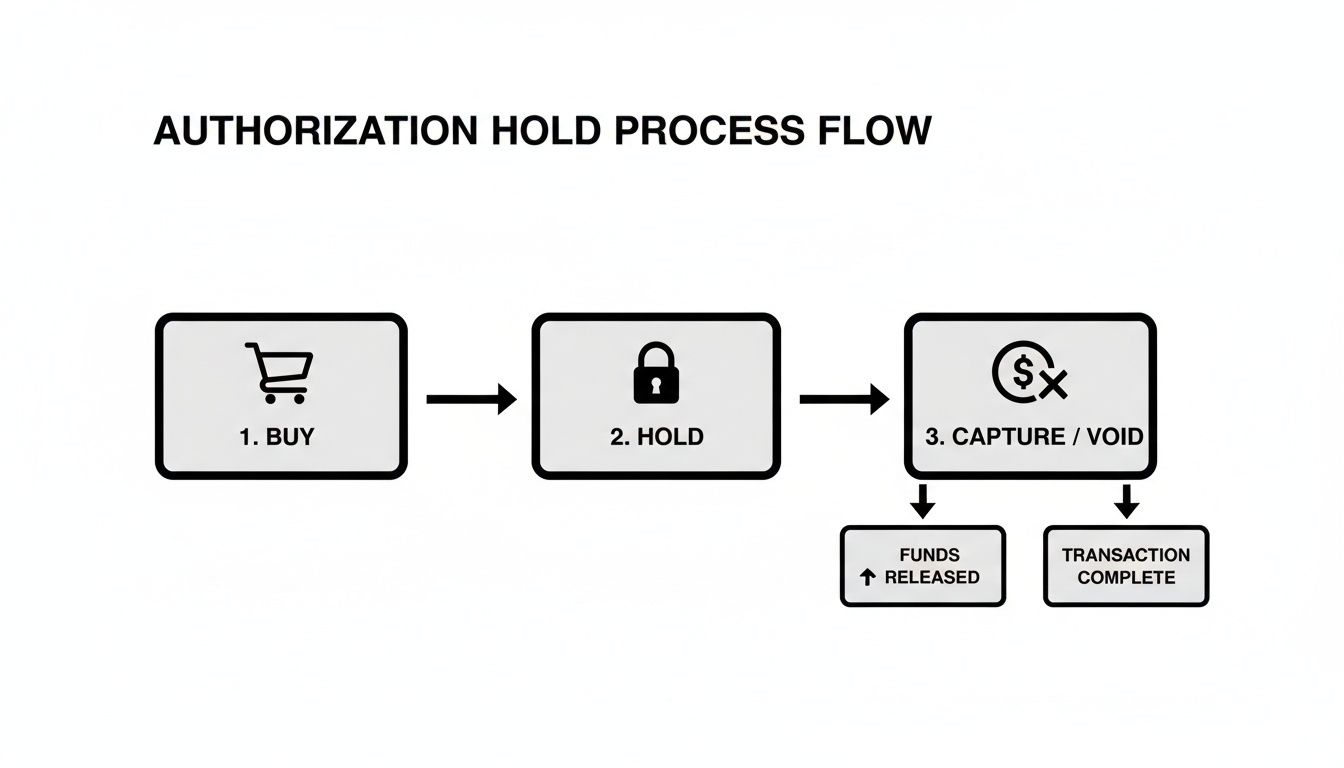
As you can see, it breaks down into three simple stages: the purchase, the temporary hold, and your choice to either capture the payment or release the funds.
Putting Pre-Auths to Work on Your Store
So, how do you actually do this? The exact steps depend on your payment gateway. Each one has its own name for the feature, but the core idea is identical.
On Shopify, you’re looking for manual payment capture. To turn it on, just head to your payment settings and switch from automatic to manual. From that point on, every approved order will only authorize the customer’s card. You’ll then have to manually click "Capture payment" on the order page when you’re ready to fulfill it.
Stripe gives you even more granular control, which is great for stores with custom-built checkouts. Using their API, you can create an authorization simply by setting the capture_method parameter to manual. This is perfect for more complex models, like handling pre-orders or services where the final cost might need an adjustment.
By enabling manual capture, you turn a standard checkout process into a flexible risk management tool. It's your opportunity to review high-value orders or flag suspicious activity before any money actually changes hands, dramatically reducing your exposure to fraud.
Why Bother With an Extra Step?
At first, adding a manual step might seem like creating more work. But the payoff is huge.
For businesses selling high-ticket items, it's a non-negotiable safety net. If you sell custom-made goods, it ensures the customer is serious before you start investing time and materials. Think of it as a small bit of friction that prevents a whole lot of pain later on.
This level of control is a cornerstone of smart payment processing. In fact, managing features like this across multiple gateways is what a payment orchestration platform is all about—helping businesses handle complex payment flows without the chaos. By taking a moment to review an order between authorization and capture, you can prevent countless headaches. We're talking about everything from shipping to a fraudster to dealing with the fallout of a stolen credit card.
It’s a small step that adds a massive layer of protection for your business.
Navigating the Common Pitfalls of Pre-Authorization
While pre-authorizations are a fantastic tool for any merchant, they're not foolproof. When things go sideways, it can create a mess of confusion for your customers and a major headache for your team. Think of this section as your field guide for handling the most frequent hiccups with clear, practical advice.
The goal here is to get ahead of these issues proactively. When you do, you can turn a potential dispute into a positive customer interaction, building trust and protecting your bottom line.
With over 827 million credit cards floating around in the U.S. alone, pre-authorizations have become the bedrock of modern e-commerce. But this same system can easily lead to chargebacks if customers get confused. As online purchase volumes soar to $3.6 trillion, it creates the perfect environment for "friendly fraud," where customers dispute legitimate holds. You can dig into more of these credit card statistics on sellerscommerce.com.
The Case of the Expiring Hold
One of the most common snags is having an authorization hold expire before you can actually capture the payment. This is a classic issue for businesses that deal with custom orders, pre-sales, or any situation where fulfillment takes longer than the standard 5-7 day hold window.
Once that hold expires, the bank releases the funds back to the customer. If you try to capture the payment after that deadline, the transaction will simply fail. Now you're stuck with an order you can't get paid for.
The Solution:
The best defense is a good offense. Get into your payment system and set up alerts that warn you when authorizations are about to expire. This gives you a crucial heads-up, allowing you to either capture the funds or reach out to the customer to re-authorize their card. It’s a simple, proactive step that prevents lost sales and awkward conversations down the line.
How to Handle Partial Shipments and Captures
Here’s a tricky one: a customer orders several items, but you can only ship part of the order right away. It's tempting to just capture the full amount and call it a day, but that's a direct path to a dispute. Customers rightly expect to be charged only for what they've actually received.
If you capture the full payment but only send half the order, you’re leaving yourself wide open for a "product not received" chargeback. From the customer's point of view, it's a completely legitimate claim, and it's one you are very likely to lose.
The Fix:
Thankfully, most modern payment gateways are built for this. They allow for partial captures, which let you capture only a piece of the original authorized amount.
- Step 1: When you ship the first part of the order, capture the exact dollar amount for those specific items.
- Step 2: The rest of the authorized amount simply stays on hold.
- Step 3: Once you ship the remainder of the order, you can capture the final balance.
This approach perfectly aligns your billing with your fulfillment schedule. It keeps your customers happy, your transaction records clean, and your chargeback risk low.
The Dreaded "Double Charge" Confusion
This is probably the number one customer complaint related to pre-auths: the dreaded "double charge" panic. A customer checks their statement and sees the initial pending authorization hold. Then, a few days later, they see the actual charge post to their account.
To someone who doesn't know the mechanics, it looks exactly like you’ve charged them twice for the same thing. This simple misunderstanding is a huge driver of otherwise preventable disputes.
Key Insight: A customer who believes they've been double-charged isn't going to email you for a friendly explanation. They're going straight to their bank to file a chargeback. Clear communication is your only real defense here.
Communication is Key:
Your best move is to educate your customers before they even have a chance to get worried. A small, clear note on your checkout page, in your order confirmation email, or on your FAQ page can work wonders.
Something simple like this is incredibly effective:
"You may see a temporary authorization hold on your card statement. This isn't a charge! It’s just a hold to verify funds, which will be replaced by the final charge once your order ships."
Adding layers of security also helps build trust and shows you're on top of your game. To get a better sense of how banks verify transactions safely, check out our guide on what is 3-D Secure authentication. A little transparency goes a long way in showing customers you have everything under control.
Best Practices for Using Authorization Holds
Think of a pre authorization credit card hold less as a technical step and more as a core part of your business strategy. It’s about shifting from a reactive to a proactive mindset. When you use these holds smartly, you can protect your revenue, cut down on disputes, and create a much smoother, less confusing experience for your customers. You're essentially turning a simple payment feature into a powerful risk management tool.
The real magic happens when you build a workflow that's both secure for your business and completely transparent for your shoppers. Get that balance right, and you'll stop problems dead in their tracks.
Be Radically Transparent with Customers
What's the number one cause of pre-auth chargebacks? Simple confusion. A customer glances at their bank statement, sees what looks like a duplicate charge, panics, and immediately calls their bank. You can head this off at the pass with clear, upfront communication.
Don’t bury your process in the fine print of a dense legal page nobody reads. Instead, put simple, plain-English explanations right where your customers will actually see them.
- Checkout Page: A quick note right below the "Place Order" button works wonders. Something like, "We'll place a temporary hold on your card now, but you won't be charged until your order ships."
- Order Confirmation Email: Reinforce that same message in the email they get right after buying. Repetition helps it sink in.
- FAQ Page: Have a dedicated section explaining exactly how authorization holds work at your store. This becomes a helpful resource for curious customers.
This simple act of transparency builds trust and nips potential disputes in the bud before they ever have a chance to grow.
Align Hold Times with Your Operations
An expired hold is a guaranteed headache. If your fulfillment process often takes longer than the standard 5-7 days—say, for custom or backordered items—you absolutely need a plan. You can't just cross your fingers and hope the hold will still be valid when you're finally ready to ship a week later.
The golden rule is simple: capture the payment before the authorization expires. If you know an order has a long lead time, you have to adjust your workflow. This might mean re-authorizing the card or working with a payment gateway that offers extended authorization windows for your specific type of business.
Aligning your holds with your operations prevents failed captures. That means you avoid the awkward and unprofessional situation of chasing down customers for payment after you've already started working on their order. It keeps your cash flow predictable and your customer interactions positive.
Ultimately, a smart pre-authorization strategy is a critical pillar of your overall risk management. It directly helps lower your dispute rate and protect your bottom line. For a deeper dive into defending your business, our guide on chargeback prevention techniques offers more actionable strategies. By integrating these best practices, you can make the pre authorization credit card process work for you, not against you.
Automating Your Defense Against Pre-Auth Chargebacks
Even if you follow every best practice, chargebacks tied to a pre-authorization credit card hold can still find their way through. The most common reason is painfully simple: a customer glances at their statement, sees the temporary hold, doesn't recognize it, and files a dispute without a second thought.
Fighting these disputes manually is a slow, frustrating grind. It pulls you away from actually running your business just to dig through order histories and authorization logs. This is exactly where automation completely changes the game.
Shifting from Manual Drudgery to a Smart Defense
Instead of you spending hours building a case from scratch, an AI-powered tool like ChargePay acts as your automated defense team. The moment a pre-auth chargeback hits your account, the system instantly gets to work on your behalf.
It doesn’t just fill out some generic form, either. The AI analyzes the specific reason code for the dispute and immediately starts gathering all the crucial evidence you need to win.
This includes things like:
- Authorization logs showing the exact time the hold was approved.
- Order details that directly connect the hold to a specific purchase.
- Shipping confirmations and delivery records.
The system then assembles this evidence into a professional, compelling response tailored to the bank’s specific requirements. All of this happens automatically, without you ever having to lift a finger.
The core benefit here is simple: you recover lost revenue and reclaim your valuable time. Instead of getting bogged down in paperwork, you can stay focused on what actually grows your business—finding new customers and creating great products.
Your Automated Safety Net
Look, pre-authorizations are a necessary and powerful tool for managing risk and securing sales. But in a world where a little customer confusion can instantly turn into a costly dispute, you absolutely need a safety net.
Automation provides just that. For anyone looking to dive deeper into how technology can manage and defend against these issues, exploring the role of AI in accounting offers some valuable insights into broader financial automation.
By automating your chargeback defense, you ensure that every single dispute is fought with the best possible evidence, maximizing your chances of winning. You turn a time-consuming operational headache into a hands-free process that protects your bottom line around the clock. Think of it as the final, critical piece of a smart pre-authorization strategy.
Frequently Asked Questions About Pre-Authorizations
We’ve covered a lot of ground, but you probably still have a few nagging questions about how a pre-authorization credit card hold actually plays out. Let's tackle the most common ones we hear from merchants just like you.
Can I Adjust the Amount of a Pre-Authorization?
Yes, you can—within limits. Most modern payment processors, like Stripe or PayPal, let you capture an amount that's less than or equal to the original authorization. Trying to capture more than the initial hold? That’s a no-go; the transaction will almost always fail.
This is incredibly useful for businesses where the final bill might fluctuate. Think about selling produce by weight or offering services with variable costs. If the final total comes in a bit lower than expected, you just capture the smaller amount, and you're all set.
What’s the Difference Between a Void and a Refund?
This is a big one. Getting this right saves you money and keeps your customers happy.
- A void is what you do when you cancel an authorization before the funds are captured. The hold on the customer's card is simply released. No money ever changes hands, and you typically don't pay a fee.
- A refund happens after you've captured the money. It's the process of sending those funds back to the customer's account, which almost always costs you in processing fees.
Think of it this way: a void is like hitting "undo" on a draft. A refund is like trying to get money back from the bank after you've already cashed the check.
A voided transaction is cleaner for everyone. It disappears from the customer's statement as if it never happened and saves you the cost and administrative hassle of processing a full refund. Always opt to void an authorization if an order is canceled pre-shipment.
Does a Pre-Authorization Guarantee Payment?
Not 100%, but it gets you pretty close. A successful pre-auth confirms two crucial things at that exact moment: the card is valid, and it has enough funds to cover the purchase. This dramatically cuts down the risk of a transaction failing later due to an empty account.
But it’s not a silver bullet. The customer could still report their card stolen an hour later or file a chargeback for a completely different reason down the road.
It’s best to see pre-authorization as a powerful risk-reduction tool, not an ironclad guarantee. It’s one of the strongest first steps you can take to make sure you get paid.
Stop losing revenue to confusing pre-auth chargebacks. ChargePay uses AI to automatically fight and win disputes on your behalf, recovering up to 80% of your lost income without any manual work. Protect your profits and automate your defense today.


.svg)



.svg)


.svg)
.svg)
.svg)