

When you sell something on your Shopify store, a small slice of that sale goes toward payment processing. Think of it as the cost of doing business online—a fee for securely handling every credit card transaction. How big is that slice? Well, it depends on your Shopify plan, but if you're using their built-in system, you're generally looking at a rate somewhere between 2.5% to 2.9% + $0.30 per online sale.
Breaking Down Your Shopify Payment Processing Fees
Setting up a Shopify store is exciting, but one of the first big money decisions you'll make is how you'll get paid. This isn't a minor detail; it directly affects how much you profit from every single thing you sell. Generally, you've got two roads you can take for accepting payments, and each one has a different price tag.
This diagram lays out the two main ways money can flow from your customer to your bank account.
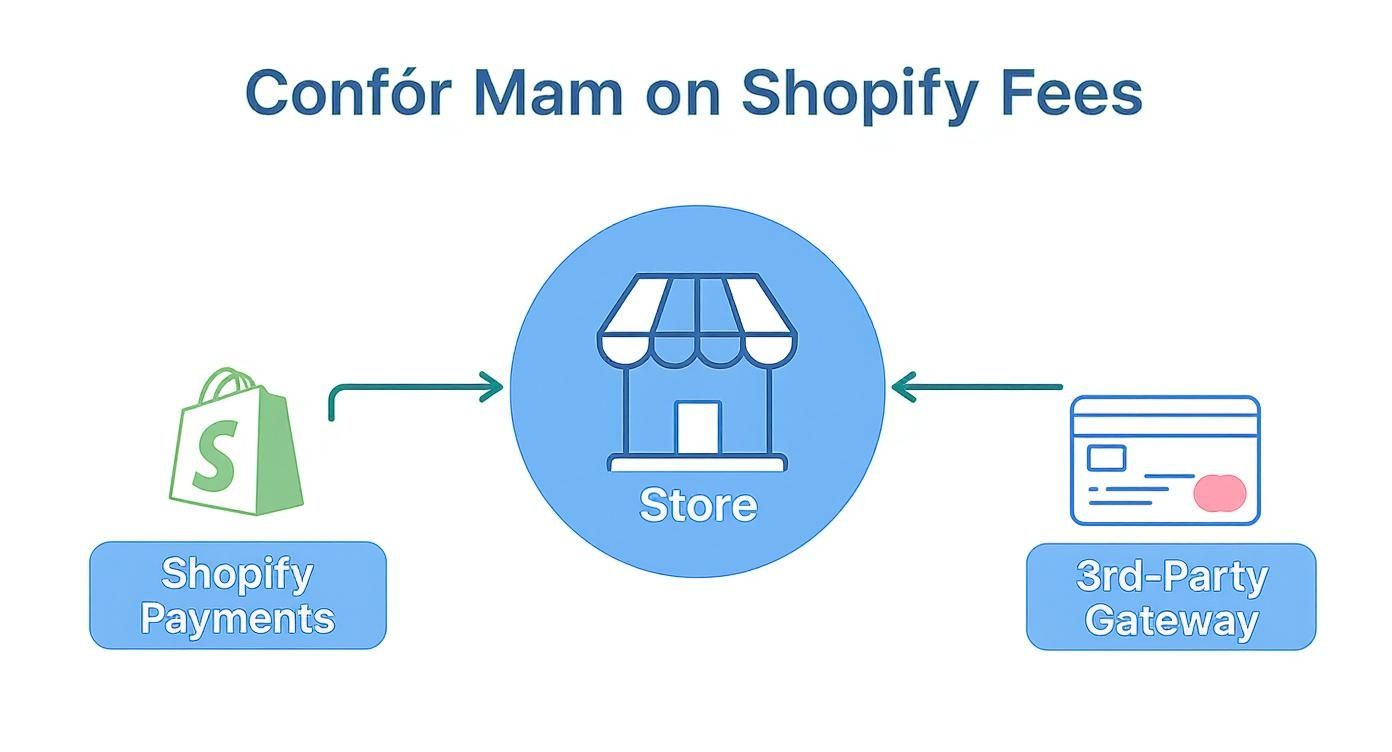
As you can see, you can either stick with Shopify's all-in-one system or bring in an outside payment gateway to handle the transaction.
Your Two Main Payment Options
The route you pick will shape both the cost and complexity of your payment setup. Here are your choices:
- Shopify Payments: This is Shopify's own, built-in processor. It’s the default, easiest, and most popular option, automatically ready to go when you create your store. The big perk is that using it means Shopify won't charge you certain extra fees.
- Third-Party Payment Gateways: These are external services you can connect, like PayPal, Stripe, or Authorize.net. You might go this route if Shopify Payments isn't available where you live or if another provider has a specific feature you absolutely need.
The core difference really boils down to simplicity versus necessity. Shopify Payments is built for a smooth, integrated experience. Third-party gateways offer more options but usually come with an extra transaction fee from Shopify on top of whatever the gateway itself charges you.
Getting a handle on these moving parts is key. If you want to dive a bit deeper into the fundamentals, it helps to understand what a payment processor is and how it acts as the middleman between your store, your customer, and the banks. This basic knowledge makes it much clearer why all these different fees exist and how they stack up, which is the first step to figuring out how to lower your costs down the road.
How Shopify Payments Works
Think of Shopify Payments as the express lane for your store’s transactions. It’s Shopify’s own, built-in payment processor, designed to work seamlessly right out of the box. You don’t need to go hunting for an external service and then figure out how to connect it; it’s already integrated directly into your dashboard, making everything from tracking payouts to managing your finances much easier.
The biggest win here is cost. When you use Shopify Payments, you completely sidestep the extra transaction fees that Shopify otherwise tacks on for using a third-party gateway. This alone makes it the most common and financially sound choice for the vast majority of store owners.

Fees Across Different Shopify Plans
Your Shopify payment processing fees aren't a flat rate. The percentage you pay is directly tied to the Shopify subscription plan you choose. As you upgrade to higher-tier plans, your processing rates go down, which can save you a significant chunk of change if you have a high sales volume.
Here’s a quick breakdown of how the standard online rates change with each plan:
- Basic Shopify: Aimed at new businesses, this plan has the highest processing fees.
- Shopify: This mid-tier plan offers a slightly lower rate, making it a great fit for growing stores.
- Advanced Shopify: Best for scaling businesses, this plan provides the lowest processing fees of the bunch.
When Shopify Payments launched back in 2013, it really shook things up by building payment services directly into the platform. This move cut out the need for merchants to juggle separate gateway accounts and their associated fees. For instance, the Basic Plan's online rate is 2.9% + $0.30, while the Advanced Plan drops to 2.5% + $0.30.
Key Takeaway: The more you pay for your monthly Shopify subscription, the less you pay on each individual sale. The trick is to figure out when your sales volume makes a plan upgrade more profitable than sticking with a lower-tier plan.
In-Person vs. Online Sales Fees
It's also important to know that fees change based on how you make the sale. Transactions processed in person using Shopify POS (Point of Sale) hardware typically have lower percentage rates than online sales. Why? Because card-present transactions are considered less risky by the banks.
On the Basic plan, for example, an online transaction costs 2.9% + $0.30, but an in-person one is just 2.6% + $0.10. While that percentage difference seems small, it really adds up over hundreds or thousands of sales. Understanding these details is crucial, and it's also helpful to compare how Shopify Payments vs Stripe differ in their overall fee structures and features.
Using Third-Party Payment Gateways
While Shopify Payments is the most direct route, it’s not your only option. Some merchants, for one reason or another, need to use an external payment gateway. Maybe Shopify Payments isn’t available in their country, or a specific third-party provider offers a feature that’s absolutely essential to their business model.
Whatever the reason, ditching Shopify’s built-in solution introduces a crucial cost you have to understand: Shopify’s additional transaction fees.
This is a fee Shopify charges on every single sale just for using their platform with another company's payment service. It’s a layer of cost that sits right on top of whatever your chosen gateway—like PayPal or Stripe—already charges you for the actual processing.
The Real Cost of Going External
That extra fee can take a serious bite out of your profit margins. Think of it like paying double on every transaction: one fee goes to your payment gateway for handling the money, and a second goes to Shopify for allowing it to happen on their turf. It’s Shopify’s way of nudging merchants toward their native solution.
The exact percentage Shopify tacks on depends entirely on your subscription plan. As you upgrade to more expensive plans, this extra fee gets a little smaller.
The Bottom Line: If you don't use Shopify Payments, you are paying a commission to Shopify on every single sale. This fee is completely separate from the processing fee charged by your third-party provider, making it vital to account for both costs.
Transaction Fees by Shopify Plan
To figure out your true shopify payment processing fees with an external gateway, you have to add Shopify's fee to your gateway's rate. For a deeper look into the various options available, you can explore this guide on different Shopify payment processors.
This is exactly why so many merchants stick with Shopify Payments. Once you start running the numbers, using an external processor can get expensive, fast.
Here’s a look at the extra fees Shopify charges if you use a third-party gateway.
Shopify's Added Fees for Third-Party Gateways
This table shows the extra fees Shopify charges per transaction if you do not use Shopify Payments.
Let's put this into perspective. Say you're on the Basic Shopify plan and use an external gateway that charges the standard 2.9% + $0.30. You’d actually be paying a whopping 4.9% + $0.30 on every online sale (2.9% to the gateway + 2.0% to Shopify).
That nearly 5% cut makes it critical to weigh the benefits of an external gateway against these substantial added costs. For many, the convenience of Shopify Payments starts to look a lot more attractive.
Diving Into Extra Costs: What About Refunds and Chargebacks?
The processing rates on your Shopify plan are just the starting line. A few other costs can pop up in the day-to-day of running your store, and if you'm not watching them, they can quietly eat into your profits. Think of them less as "hidden fees" and more as the overlooked costs of doing business.
One of the biggest culprits is the chargeback fee. A chargeback is what happens when a customer skips talking to you and goes straight to their bank to dispute a charge. When this happens, Shopify hits you with a non-refundable administrative fee—usually around $15 in the U.S.—just for managing the dispute process.

Here's the kicker: you pay that fee whether you win or lose the dispute. If you lose, you're out the original sale amount, the product you shipped, and the $15 fee. It's a painful triple-whammy. Getting a handle on what a chargeback fee entails is your first line of defense against these profit-killers.
The Real Cost of a Refund
Refunds also have a financial sting that catches a lot of new merchants off guard. When you issue a refund, you give the customer their money back, but you don't get the original payment processing fees back from Shopify.
It makes sense when you think about it. The payment processor did its job successfully the first time around, and their fee covers that service. The refund is a completely separate transaction where you're sending money back to the customer, but the cost of that initial payment is set in stone.
Let's Break Down a Refund:
A customer buys a $100 product. If you're on the Basic Shopify plan, you'll pay $3.20 in fees (2.9% + $0.30), so your payout is $96.80. If that customer returns the item, you refund them the full $100. That $3.20 processing fee? It's gone for good. Your total loss on the transaction is that $3.20 plus whatever you spent on shipping.
This isn't a Shopify-specific thing; it's standard practice across the payments industry. It's just a critical cost you need to factor into your financial planning, especially if you have a high return rate.
Selling Abroad? Watch for These Fees
If you're selling to customers in other countries, you'll run into another layer of fees: currency conversion. When a customer pays in a currency that’s different from your own payout currency, Shopify has to convert the funds for you.
Shopify charges a fee for this service. The rates depend on where your store is based, but they're typically:
- 1.5% for stores in the United States.
- 2.0% for stores in most other countries.
This fee gets tacked on top of your regular credit card processing rate. Expanding globally is a great growth strategy, but you have to build these currency conversion costs into your pricing to protect your margins.
How to Lower Your Payment Processing Costs
Knowing what you’re paying in Shopify fees is one thing; actively finding ways to shrink those costs is how you actually boost your bottom line. While you can't just call up Shopify and negotiate their base rates, you have more control over your net costs than you might realize. A few smart moves can lead to some serious savings over time, letting you keep more of the revenue you work so hard for.
The single biggest lever you can pull is upgrading your Shopify plan. I know, it sounds backward—paying more on your subscription to save money—but the math often works out, especially as your sales numbers climb.
Find Your Plan Upgrade Break-Even Point
Every time you move up a Shopify plan tier, you get a better processing rate. The trick is to figure out the exact sales volume where the money you save on fees is more than the extra cost of the subscription.
Let's run the numbers. Imagine your store is on the Basic plan ($39/month, 2.9% + $0.30 fee) and you’re eyeing the Shopify plan ($105/month, 2.7% + $0.30 fee). The rate difference is a small but mighty 0.2%. To find your break-even point, you need to see when that 0.2% savings covers the $66 jump in your monthly bill.
Here's the quick math:
$66 (Subscription Difference) ÷ 0.002 (Fee Rate Difference) = $33,000What this means is simple: once your store is consistently pulling in $33,000 or more in monthly sales, upgrading to the Shopify plan starts making you money. Every dollar you process after that point is pure savings.
Proactively Prevent Costly Chargebacks
Chargebacks are the silent killers of profit. It’s not just about losing the sale and maybe the product; you also get slapped with a dispute fee that you'll never see again. The best way to deal with these costs is to stop them before they even happen.
Here are a few best practices you can put in place today:
- Crystal-Clear Product Descriptions: Use high-quality photos and be brutally honest about your product’s features, size, and materials. The number one reason for disputes is that the product didn't match what the customer was expecting.
- Transparent Shipping and Return Policies: Don't bury your policies in the footer. Make them easy to find and even easier to understand. Be upfront about shipping times and send out tracking information the second it's available.
- Exceptional Customer Service: Make it ridiculously easy for customers to contact you. A quick, professional reply to an email can be the difference between a happy customer and one who goes straight to their bank to file a chargeback.
When you're looking at your options, it’s always a good idea to compare payment processing fees from different providers, since the advertised rates don't always tell the whole story.
Using an integrated system like Shopify Payments also gives you a statistical advantage. Shopify has reported that merchants using Shopify Payments with Shop Pay see checkout conversion rates jump by up to 50%. On top of that, they have a 45% higher success rate when fighting chargeback disputes, which directly cuts down on fraud-related losses. For stores with more complex payment needs, looking into payment orchestration platforms can open up more advanced ways to route transactions and trim costs.
Common Questions About Shopify Fees
Diving into the world of Shopify payment processing fees can feel a bit like learning a new language. To help cut through the confusion, we’ve rounded up the questions we hear most often from merchants, with straight-to-the-point answers to help you make smarter financial decisions.
Do I Have to Use Shopify Payments?
Nope, you’re not locked into using Shopify Payments. Shopify gives you plenty of flexibility, supporting over 100 different third-party payment gateways like PayPal or Stripe.
But there’s a pretty big catch. If you decide to go with an external gateway, Shopify tacks on its own separate transaction fee to every single sale. This fee gets charged in addition to whatever your chosen payment provider charges you.
This extra fee starts at 2.0% for the Basic plan and goes down to 0.6% on the Advanced plan. Because this fee is completely waived when you use Shopify Payments, it ends up being the most cost-effective option for the vast majority of sellers on the platform.
Transaction Fee vs. Processing Fee: What Is the Difference?
This is easily one of the most important things to get straight.
Think of a "payment processing fee" as the standard cost of doing business online. It's what any processor—whether it's Shopify Payments or an external one—charges to handle a credit card transaction. This is almost always a small percentage plus a fixed amount, like the familiar 2.9% + $0.30.
A "transaction fee," on the other hand, is something else entirely. It's an extra fee Shopify charges you only if you choose not to use their in-house Shopify Payments service. It’s essentially Shopify's cut for letting an outside payment service operate on their turf.
To put it simply: everyone pays a processing fee, no matter what. But you only get hit with the additional Shopify transaction fee if you opt out of their integrated Shopify Payments system.
This two-fee structure is a pretty powerful nudge to keep merchants within Shopify’s payment ecosystem.
Do I Get Processing Fees Back on Refunds?
Unfortunately, no. When you refund a customer, the original payment processing fees you paid are not returned to you.
The moment your customer made the purchase, the banks and payment networks involved did their job of securely moving the money and took their cut for that service. That job was successfully completed. Refunding the order means you're sending the full purchase amount back out of your own pocket, but the cost to process that initial sale is gone for good.
This isn't just a Shopify rule; it's standard practice across the entire payments industry. It’s a crucial cost to factor into your business finances, especially if your store tends to have a higher-than-average return rate. To fully evaluate the financial ecosystem around your sales, it's beneficial to understand the merchant cash advance pros and cons and other financial products that can impact your revenue.
How Do I Calculate the Fee for a $100 Sale?
Let's break it down with a simple, real-world example. We'll use the Basic Shopify plan, where the online rate for Shopify Payments is 2.9% + $0.30 per transaction.
For a $100 sale, the math is straightforward:
- Calculate the percentage: $100 * 0.029 = $2.90
- Add the fixed fee: $2.90 + $0.30 = $3.20
The total fee for that $100 transaction comes out to $3.20. After fees, your final payout would be $96.80.
Now, let's see what happens if you were using a third-party gateway instead. You'd pay that gateway's fee (let's assume it's the same 2.9% + $0.30) plus Shopify's 2% transaction fee for being on the Basic plan. That would add another $2.00 to your costs, pushing your total fee to $5.20 and shrinking your payout to just $94.80.
Managing disputes manually is a drain on your time and money. ChargePay uses AI to automatically fight and win chargebacks for you, recovering up to 80% of your lost revenue without any effort on your part. Stop letting illegitimate disputes hurt your bottom line and see how much you can recover at https://www.chargepay.ai.


.svg)



.svg)


.svg)
.svg)
.svg)