


Of all the reasons a customer's payment might fail, Decline Code 51 is the one you’ll see most often. It’s the digital equivalent of a customer’s card being declined at a physical checkout—the desire to buy is there, but the money isn't available at that exact moment. For you as a Shopify merchant, this isn't just a lost sale; it's a massive opportunity to recover revenue.
What Decline Code 51 Is Costing Your Store

Every time a "payment failed" notification pops up, there's a strong chance Decline Code 51 is the culprit. While it feels like a dead end, it's actually what's known as a "soft decline"—a temporary problem that you can often fix. Your customer wanted your product, but their bank put a stop to the transaction simply because their account balance was too low.
This isn't a red flag for fraud or a problem with your payment gateway. It's a straightforward cash flow issue on the customer's end. But these small, individual declines add up, quietly draining your revenue month after month.
To put this in perspective, here's a quick look at what Decline Code 51 means for you.
Decline Code 51 Quick Facts
As you can see, this isn't a lost cause. It's a signal to act.
The Real Cost of a Single Decline
A single Decline Code 51 isn't just one lost order. It triggers a ripple effect that can hurt your business in more ways than one:
- Lost Customer Lifetime Value: A good customer who gets frustrated by a failed payment might just give up and never come back, costing you all their future purchases.
- Wasted Marketing Spend: You paid to get that customer to your checkout page—whether through ads, email, or social media—only to lose them at the very last step.
- Increased Cart Abandonment: Failed payments are a top reason customers abandon their carts. We actually cover how to fix this in our guide on the topic: https://www.chargepay.ai/blog/how-to-reduce-cart-abandonment
Industry benchmarks show that Decline Code 51 is responsible for about 40% of all legitimate payment failures in e-commerce. For a Shopify store running on tight margins, that's a huge chunk of revenue just waiting to be recovered.
To get a handle on these declines and start winning back sales, you need solid analytics. Knowing your numbers is everything. You can learn more about how to manage your data and Grow Your Shopify Store With Better Ad Tracking And Data Driven Decisions.
Understanding why this specific code happens is the first step. Once you know the "why," you can build a strategy to turn these failed payments into successful ones, protecting your bottom line from this common but fixable problem.
Understanding Soft Declines and Hard Declines
Not all payment declines are created equal. As a merchant, knowing the difference is the first step in building a smart recovery strategy. Transaction declines really fall into two buckets: soft declines and hard declines. This simple distinction tells you where to focus your energy and, just as importantly, when to cut your losses.
A soft decline, like the notorious Decline Code 51, is a temporary roadblock. Think of it as a door that’s temporarily jammed, not locked forever. The customer absolutely wants to buy, but their bank has hit the pause button on the transaction for a reason that can usually be fixed.
What Is a Soft Decline?
A soft decline happens when the customer's bank (the issuing bank) gives the transaction a thumbs-up in principle but stops it because of a temporary hiccup. The card itself is perfectly valid, and the account is in good standing. The problem is usually fleeting.
Here are some of the usual suspects behind a soft decline:
- Insufficient Funds (Decline Code 51): This is the big one. The customer's account balance was just a little too low at the exact moment of the purchase.
- Incorrect CVV or Expiry Date: A simple typo during checkout. It happens to the best of us.
- Suspected Fraud: The bank’s automated systems flagged the transaction as unusual. This often happens with legitimate purchases made from a new device or location.
- Communication Error: A momentary network glitch between the payment gateway and the bank.
The key takeaway here is that soft declines represent recoverable revenue. The customer’s intent to buy is strong, and the problem can often be solved with a quick retry or a simple heads-up to the customer.
What Is a Hard Decline?
On the flip side, a hard decline is a permanently locked door. The issuing bank is giving you a firm and final "no," and retrying the transaction is a complete waste of time.
A hard decline signals a permanent, non-fixable problem with the card or the account itself. This includes situations where:
- The card has been reported lost or stolen.
- The customer's bank account has been closed.
- The card number is invalid or simply doesn't exist.
Trying to run a card that received a hard decline is not only pointless but can also get your merchant account flagged as risky by payment processors. The sale is not recoverable through that payment method. Understanding this difference is critical for any online merchant, especially in the world of Card-Not-Present (CNP) transactions, where these nuances are a part of daily business. Focus your efforts on the soft declines—that’s where you’ll find your lost sales.
How to Safely Retry a Declined Transaction
When you see a Decline Code 51, your first instinct might be to hammer the "retry" button. Hold on. That’s a critical mistake that can turn a temporary soft decline into a real headache, especially if you're a Shopify merchant. Payment networks have very clear rules about retries, and breaking them can lead to automatic penalties.
Being too aggressive with retries after an "insufficient funds" decline is a fast track to a chargeback. Instead of just losing out on the sale, you could be on the hook for a dispute fee and the full transaction amount. A little patience and strategy are all it takes to avoid these penalties and actually recover the sale.
This flowchart lays it all out. It shows the clear fork in the road between a soft decline—which gives you a path to recovery—and a hard decline, which is a dead end.
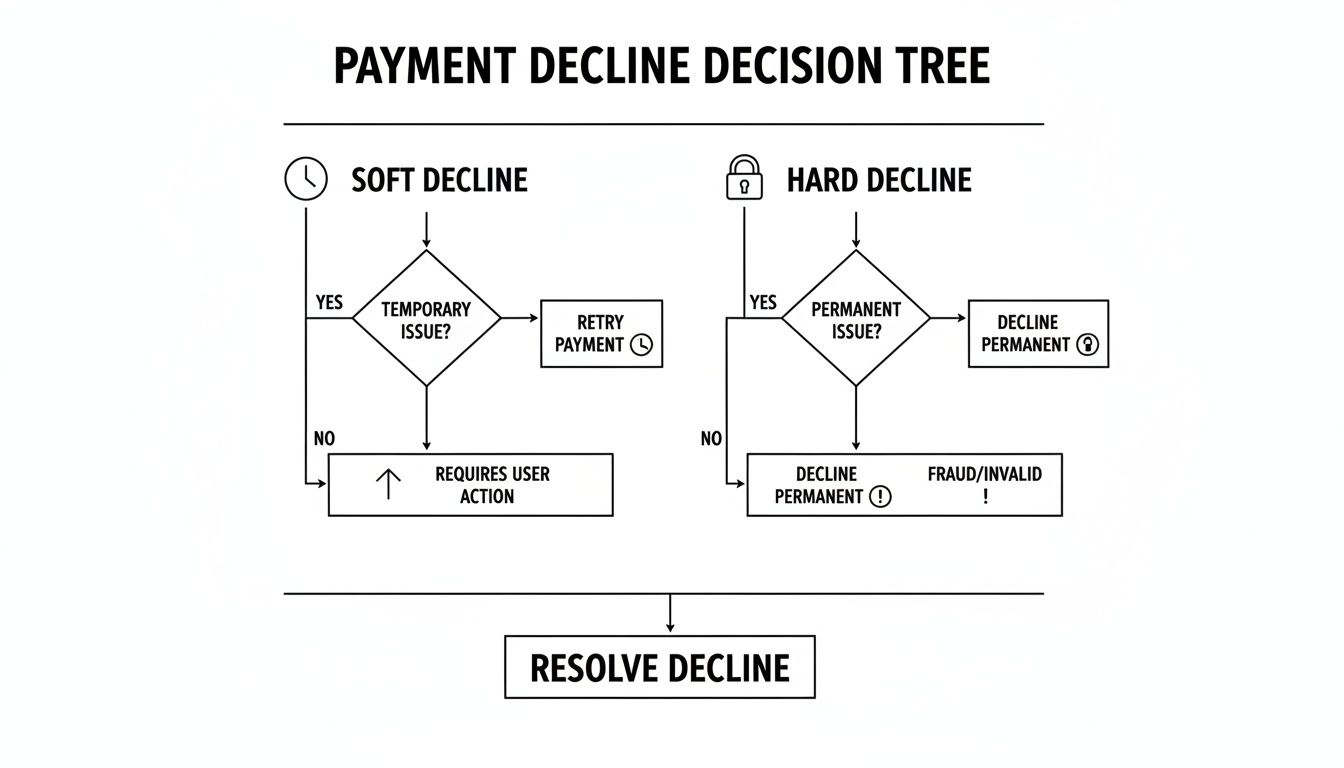
The real insight here is that soft declines like Code 51 are opportunities. Hard declines, on the other hand, are a clear signal to stop and ask your customer for a different payment method.
The Right Way to Time Your Retries
With declines, timing is everything. Since a Code 51 is often just a temporary cash flow problem, waiting is your best move. Think about it: many people get paid on Fridays. Simply waiting until the end of the week to retry the transaction can massively boost your odds of success.
A huge change in this space is Visa's "dark period" rule. After getting a Code 51 decline, merchants are now subject to a 12-hour no-retry window. If you try to process that payment again within this period, you could trigger an automatic chargeback for an invalid authorization. You can get into the nitty-gritty of these specific chargeback codes and their consequences on PayCompass.com.
A single misstep here is costly. Retrying a $100 order too soon means you’re not only out the $100 but also hit with a chargeback fee.
Instead of hitting retry manually and crossing your fingers, a smarter, automated approach is the way to go. You can also look into different authorization techniques to secure the funds without capturing them right away. Our guide on credit card pre-authorization breaks down how this can be a powerful tool in your payment strategy. It's all about protecting your merchant account's health while intelligently increasing your chances of capturing the sale.
Communicating with Customers After a Declined Payment
A declined payment is an awkward moment. For the customer, it can be embarrassing or frustrating. For you, it's a critical moment that can either save the sale or lose a customer for good. The key is to turn that point of friction into a genuinely helpful customer service interaction.

That standard, cold "Payment Failed" error? It’s a dead end. It almost feels like you’re blaming the customer, which is a surefire way to make them abandon their cart and never come back. A simple shift in your language can change everything.
Decline Messaging That Wins or Loses Sales
Instead of just telling the customer something went wrong, you need to guide them toward a solution. The right messaging can immediately recover a sale by showing them the next step. It’s a small change, but the impact is huge.
The table below shows just how different the customer experience can be based on a few words.
Notice the difference? The effective messages are empathetic, take the blame off the customer, and immediately offer a clear path forward. You're not just reporting a problem—you're partnering with them to solve it.
What If the Customer Leaves?
Sometimes, a customer will see the decline and just leave your site. This is where automated emails become your best friend. A gentle, non-aggressive follow-up can give them a second chance to complete their purchase on their own terms.
Set up a simple email that triggers a few hours after a failed payment. This email should do three things:
- Gently remind them about their cart.
- Provide a direct, one-click link back to checkout.
- Reassure them that their information is safe and secure.
These small, thoughtful touches are what the best practices in customer service are all about. They build loyalty, recover lost revenue, and reinforce a positive brand experience, even when a transaction doesn't go smoothly the first time.
The Hidden Link Between Declines and Chargebacks
A soft decline for "insufficient funds" feels like a simple lost sale, but the way you react can turn it into a much bigger financial headache. While Decline Code 51 isn't fraud, how you handle it can absolutely open the door to expensive chargebacks.
Think about it from the customer's perspective. When you impatiently retry their card right after it was declined, you're not just breaking payment network rules. You're creating confusion and frustration. They might see multiple pending charges, panic, and file a chargeback—turning a simple funding issue into a costly, time-consuming dispute.
This problem can snowball. A high rate of declines makes your merchant account look risky to payment processors, which can lead to lower approval rates across the board. It’s a dangerous cycle: more declines lead to desperate retries, which in turn lead to more chargebacks.
The Scale of the Problem
A smart decline management process is your first line of defense. Statistically, Decline Code 51 for insufficient funds is the most common reason for declines, making up a staggering 40% of all cases. This issue is deeply connected to the chargeback epidemic, which now totals over 238 million cases yearly in the U.S. To make matters worse, merchants only manage to reclaim their funds about 45% of the time. You can explore more data on decline code trends from Chargebacks911.
At ChargePay, we see this connection every day. Merchants who aggressively retry declined transactions often see a spike in chargebacks. A disciplined approach to handling declines is non-negotiable for protecting your revenue.
Even with a perfect decline strategy, some chargebacks are unavoidable. That's why you need an automated defense in your corner. ChargePay has helped merchants win back over $2.8 million from more than 100,000 disputes, achieving a 92.4% win rate.
Our AI-powered platform, built specifically for Shopify and rated 4.9-stars, handles the entire dispute process for you. Stop losing money to declines that turn into chargebacks. Install ChargePay from the Shopify App Store and let our AI win them back for you.
Automate Your Chargeback Defense with ChargePay
Even when you have a solid game plan for tackling decline code 51, some chargebacks are just going to happen. It's a frustrating part of e-commerce. Fighting those disputes yourself is a slow, painful grind that pulls you away from what you should be doing: growing your business. This is where automation becomes your secret weapon.
The second a chargeback hits your Shopify store, ChargePay’s AI gets to work. We don’t just plug details into a generic template. Our system actually analyzes the dispute and automatically gathers the specific evidence required to win it. With over 100,000 disputes handled and more than $2.8 million recovered for merchants, we've proven our AI gets real results.
Get Your Money Back Without the Manual Work
Stop losing sleep over response deadlines or scrambling to find screenshots. Our AI builds a rock-solid evidence package and submits a winning response for you, hitting a 92.4% win rate. This is how you stop the bleeding and turn a revenue drain into a problem you no longer have to think about.
As a 'Built for Shopify' app with a 4.9-star rating, we're trusted by thousands of store owners to protect their bottom line. Our transparent pay-per-win model means you only pay when we successfully recover your money.
Fighting every single dispute on your own is an uphill battle you can't win. With ChargePay, you have an expert system fighting—and winning—for you 24/7. You can explore the full range of our AI-powered chargeback management tools to see how we can shield your store's revenue.
Don't let preventable losses chip away at your profits. It's time to stop losing money to disputes you should be winning. Install ChargePay from the Shopify App Store and let our AI turn your chargeback headaches into recovered cash.
Got Questions About Decline Code 51? We’ve Got Answers.
When a transaction gets hit with a decline code 51, it can be confusing. You’re not alone in wondering what it means and what to do next. We’ve rounded up the most common questions we hear from Shopify store owners like you.
Is Decline Code 51 a Sign of Fraud?
Nope, not at all. A decline code 51 is pretty straightforward: it just means the customer’s bank account didn’t have enough funds to cover the purchase at that exact moment. The customer fully intended to buy from you; they just came up a little short on available cash.
How Long Should I Wait to Retry a Declined Transaction?
Patience is key here. Give it at least 24-48 hours. Think about when people typically get paid—often at the end of the week. Retrying a failed transaction from a Tuesday on a Friday can be a surprisingly effective move. Whatever you do, never retry the card immediately. That’s a fast track to getting penalized.
Can I Be Penalized for Retrying a Card?
Yes, you absolutely can. Payment networks like Visa have strict rules about this. If you retry a card too often or too quickly after it’s been declined, you can get hit with penalties. This can even trigger automatic chargebacks, which means you lose the sale and get stuck with an extra dispute fee. It's a lose-lose situation.
What’s the Best Way to Communicate a Decline to a Customer?
The goal is to be helpful, not accusatory. A blunt "Payment Failed" message feels like hitting a brick wall. Instead, try framing it with a little more empathy. Something like this works wonders:
"It looks like there was an issue processing your payment. Feel free to try another card or check back in a day or two. We've saved your cart for you!"
This simple shift in language turns a frustrating moment into a positive customer service touchpoint. It keeps the door open and makes it much more likely they’ll come back and finish their purchase.
Even with the best decline strategy, chargebacks can still sneak through. That’s where ChargePay comes in. Our AI has already handled over 100,000 disputes, recovered $2.8 million for merchants, and has a 92.4% win rate. As a 4.9-star 'Built for Shopify' app, we’re here to make your chargeback problem a thing of the past.
Install ChargePay from the Shopify App Store and let our AI win for you.


.svg)



.svg)


.svg)
.svg)
.svg)