

A shopper lands on your Shopify store, adds two items, gets to checkout, and then sees a browser warning or an inconsistent padlock state. That sale is already in trouble. Most buyers won't troubleshoot your security setup. They leave.
That's why SSL certificate importance isn't a developer-only topic. It's a revenue topic. If your store looks unsafe, customers hesitate before they pay. If your HTTPS setup is broken, you also create openings for interception, fraud, and the kind of messy customer experience that later turns into disputes.
This matters even more now because secure browsing is no longer a nice extra. As of June 2025, 88.08% of websites use HTTPS by default, which means customers expect every legitimate store to be secure, not exceptional for being secure (SSL/TLS adoption trends). If your store falls short, you don't look unique. You look suspicious.
And suspicious stores pay for it twice. First at checkout, when buyers bail. Then after fulfillment, when shaky trust makes customers quicker to file a dispute instead of contacting support first. If you're already dealing with lost revenue from disputes, it helps to understand the full chain. This breakdown of Shopify chargebacks is worth reading after you lock down the basics.
Introduction
SSL matters because online trust is fragile.
In a physical store, customers can see the building, the staff, the card terminal, the receipt printer. On a website, they judge trust in seconds from a handful of cues. HTTPS is one of the biggest ones. If the browser says your store isn't secure, the customer assumes the risk is theirs. They won't wait around to find out whether your product is worth it.
Why this hits sales fast
A broken or missing SSL certificate doesn't just create a technical flaw. It interrupts the buying decision at the worst possible moment. The customer is already thinking about card details, account login, shipping address, and whether they trust you enough to hand over all of it.
When the browser signals doubt, the customer usually follows it.
If your checkout feels unsafe, shoppers don't need proof. Suspicion is enough to kill the order.
That's the practical side of SSL certificate importance. It protects data, yes. But for a Shopify merchant, the immediate business outcome is simpler. You keep trust intact during the moments that decide whether revenue comes in or disappears.
Why this also affects disputes
Security signals shape what happens after the sale too. Customers who felt uncertain during checkout are more likely to question the charge later. That doesn't mean every insecure-looking store causes chargebacks. It does mean weak trust makes disputes easier to trigger and harder to calm down.
That's the part too many merchants miss. SSL is your front-line trust control. It won't solve fraud by itself, but it helps prevent the kind of shaky experience that feeds both abandoned carts and post-purchase conflict.
What an SSL Certificate Actually Does for Your Store
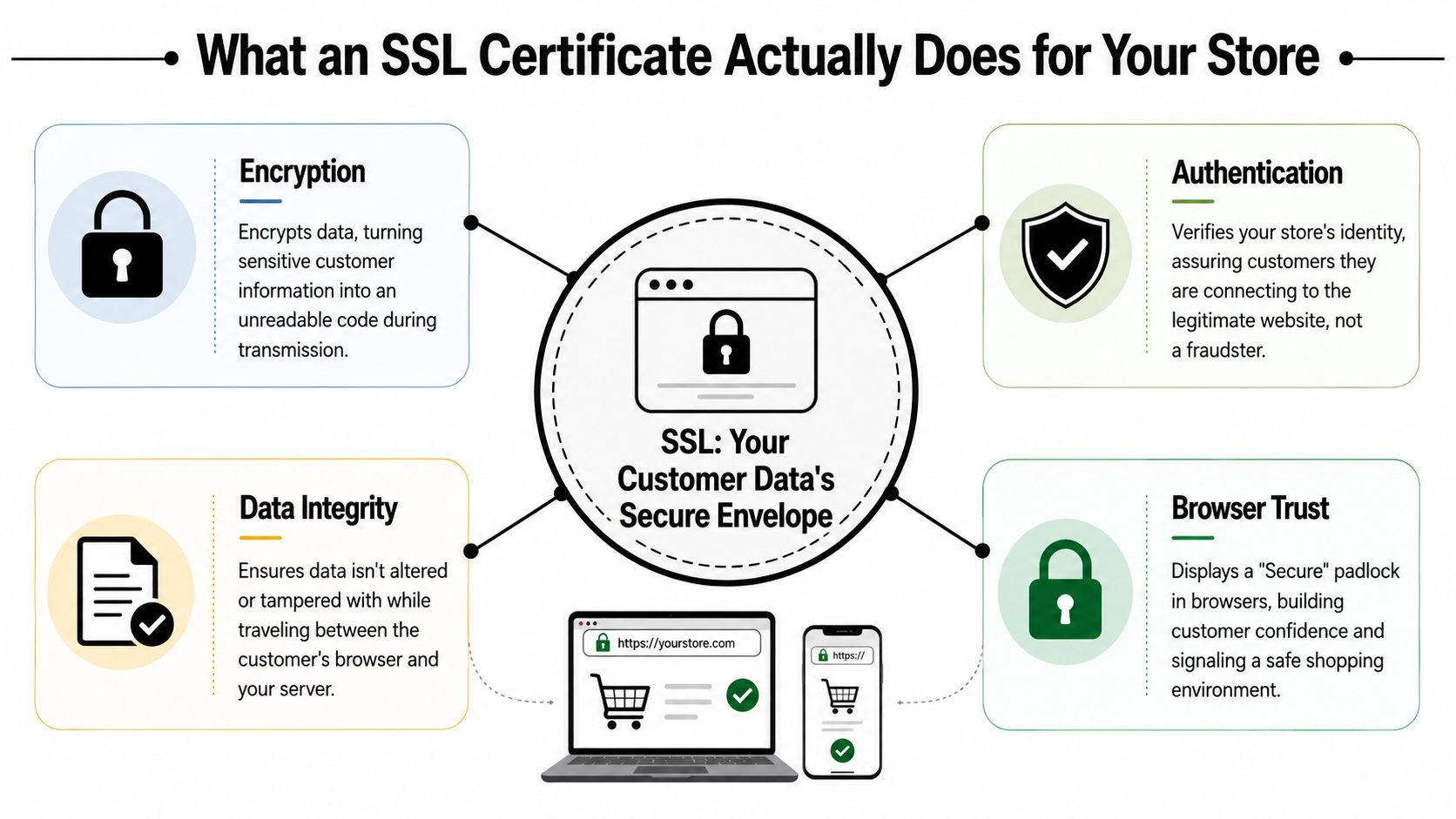
An SSL certificate does two jobs that every Shopify store needs. It encrypts data in transit and it proves the browser is connected to your real store, not an impostor.
Imagine a sealed envelope with the correct delivery name on the front. The seal stops outsiders from reading the contents while the envelope is moving. The name check helps make sure the envelope is going to your store, not to someone pretending to be you.
Encryption protects the trip
When a shopper logs in, enters an address, or starts checkout, that information travels between their browser and the server. Without SSL, that trip is exposed. With SSL, the information is scrambled so outsiders can't read it during transmission.
This is the part most merchants already know. What matters is where it shows up in real life. Login credentials, contact details, checkout data, and payment-related activity are all moving through that connection. If it's not protected, you're asking for trouble.
Identity verification protects the destination
This is the part people skip, and it's the part that matters most for fraud risk.
Browsers use the certificate as an identity layer before they complete the TLS handshake. That certificate-based identity check helps block impersonation and man-in-the-middle interception, especially on login and checkout flows where stolen credentials can turn directly into fraud (how SSL certificates work in TLS).
If you want a plain-English refresher on man-in-the-middle risk, this guide on safeguarding your business data is useful.
Practical rule: Encryption without identity verification isn't enough. Your customer needs both. Their data must be unreadable, and the browser must confirm it's going to your real domain.
What this means for Shopify checkout
For a Shopify merchant, the useful takeaway is simple:
- Login protection: SSL helps protect customer credentials while they move between browser and server.
- Checkout trust: The certificate tells the browser your store is the intended destination before sensitive actions continue.
- Fraud reduction at the transport layer: It cuts off a common path for interception-based attacks.
- Cleaner security architecture: It works alongside other controls, not instead of them.
If you want the next layer after transport encryption, compare it with encryption vs tokenization. They solve different problems, and merchants often mix them up.
The Business Case for SSL Beyond Basic Security
The business case for SSL isn't “Google might like you more.” That thinking is outdated. Its core value is preventing obvious trust damage that wrecks buying intent.

HTTPS is now the minimum
Modern browsers treat HTTPS like table stakes. A current explainer on SSL and website importance puts it plainly: the old HTTPS ranking boost is basically baseline now, and the main business value is preventing browser warnings and preserving checkout confidence (why SSL still matters for websites).
That means the old question, “Should I get SSL for SEO?” is the wrong question.
The right question is, “What happens to my store if shoppers see warnings, hesitation cues, or inconsistent security signals?” The answer is obvious. They stop trusting the site.
Trust signals affect buying behavior
Shoppers don't audit your stack. They scan for reassurance.
A secure URL, a stable padlock state, and a consistent HTTPS experience across product, cart, and checkout pages all say the same thing. This store looks legitimate. That lowers friction right when someone is deciding whether to enter personal and payment information.
Here's the simplest way to understand it:
| Store signal | Buyer interpretation | Business outcome |
|---|---|---|
| HTTPS everywhere | “This store looks normal and safe” | Less hesitation |
| Security warning | “Something is off” | More abandoned sessions |
| Mixed secure and insecure elements | “I'm not sure this is reliable” | Lower checkout confidence |
Professionalism counts more than merchants admit
SSL also signals operational competence.
Customers may not know what a certificate authority is. They do know when a store feels amateur. If your store triggers warnings, loads insecure elements, or flips between secure and insecure behavior, buyers assume the rest of the operation is just as sloppy. That includes shipping, refunds, and post-purchase support.
This video gives a useful visual explanation of why secure browsing matters in practical terms:
That's why SSL certificate importance goes beyond “security.” It affects brand perception, conversion quality, and whether a first-time customer is willing to complete an order.
The Direct Link Between SSL and Chargeback Prevention
Here's the part most SSL articles miss. Poor HTTPS implementation can increase chargeback risk, directly and indirectly.

Weak transport security raises fraud exposure
If data moving through your store isn't properly protected, attackers have a better chance to intercept sensitive activity. That can lead to stolen credentials, hijacked sessions, and fraudulent transactions that end up disputed later.
For a Shopify merchant, that means SSL isn't just a trust badge. It's part of your fraud prevention stack. It reduces one path attackers use to get between your customer and your store.
But don't overstate it.
Cloudflare's SSL explainer makes an important distinction: an SSL/TLS certificate encrypts traffic in transit, but it does not by itself stop all fraud. Phishing sites and fake storefronts can still use HTTPS, which means SSL is a transport-layer control, not a complete anti-fraud solution (what SSL certificates do and don't do).
Low trust also feeds friendly fraud
This is the softer side of the problem, but it matters.
A customer who felt uneasy during checkout is quicker to assume the worst later. Maybe they don't recognize the descriptor. Maybe shipping is delayed. Maybe they forgot the purchase. If the original buying experience already felt a little sketchy, they're less likely to contact support first and more likely to call the bank.
That's where SSL certificate importance overlaps with dispute prevention. Clean trust signals reduce confusion. Confused customers create chargebacks.
A store that looks careless at checkout often gets less benefit of the doubt after the charge posts.
SSL is the first layer, not the full system
You still need fraud screening, clear order communication, solid customer support, and fast dispute handling. SSL just makes the rest of that system work on stable ground.
Use it as one layer in a broader playbook:
- Protect checkout traffic: Keep customer data encrypted while it moves.
- Reduce impersonation risk: Make browser identity checks work in your favor.
- Avoid avoidable doubt: Don't give customers visual reasons to mistrust the transaction.
- Back it up with operational controls: Fraud tools, order transparency, and strong evidence still matter.
If you're tightening the full process, this guide to chargeback prevention is the logical next step.
Meeting PCI Compliance with Mandatory SSL
If you accept card payments online, SSL is not optional.
For PCI DSS-relevant environments, SSL/TLS certificates are mandatory for protecting sensitive data such as card numbers in transit, and failing to maintain valid certificates can create both compliance failures and browser trust issues (PCI-related SSL requirements explained).
What that means in plain English
If customer payment data moves across public networks, that transmission must be protected. That's exactly what TLS is for. No SSL setup, no credible compliance story.
This isn't just about avoiding technical criticism from a security team. It affects whether your payment environment is being handled responsibly in the first place. If your certificate is invalid, expired, or inconsistently deployed, you're stacking compliance risk on top of sales risk.
The operational mistakes that hurt merchants
Most SSL problems aren't dramatic hacks. They're boring failures:
- Expired certificates: Your store suddenly shows browser trust issues.
- Partial HTTPS coverage: Some pages are secure, others aren't.
- Broken third-party elements: Secure pages load insecure assets and trigger warnings.
- Neglected monitoring: Nobody notices the problem until customers do.
Operational reality: SSL failures often show up first as lost checkouts, not security tickets.
If you process payments through Shopify, review how those disputes and payment flows connect in practice. This overview of Shopify Payments chargebacks helps frame the downstream risk.
Your SSL Verification Checklist for Shopify
A shopper taps your ad, lands on a product page, and sees a browser warning or a page with broken secure elements. That customer rarely stops to diagnose the issue. They leave, buy from someone else, or come back later ready to dispute a charge because your store felt off from the start.
That is why SSL checks belong on your revenue checklist, not just your security checklist.
1. Check the pages customers actually use
Shoppers expect HTTPS everywhere. If even one important page looks insecure, trust drops before checkout starts.
Open your store on desktop and mobile and manually test:
- Homepage
- Collection pages
- Product pages
- Cart
- Customer login and account pages
- Policy pages
- Blog posts
- Landing pages tied to ads, email, or influencers
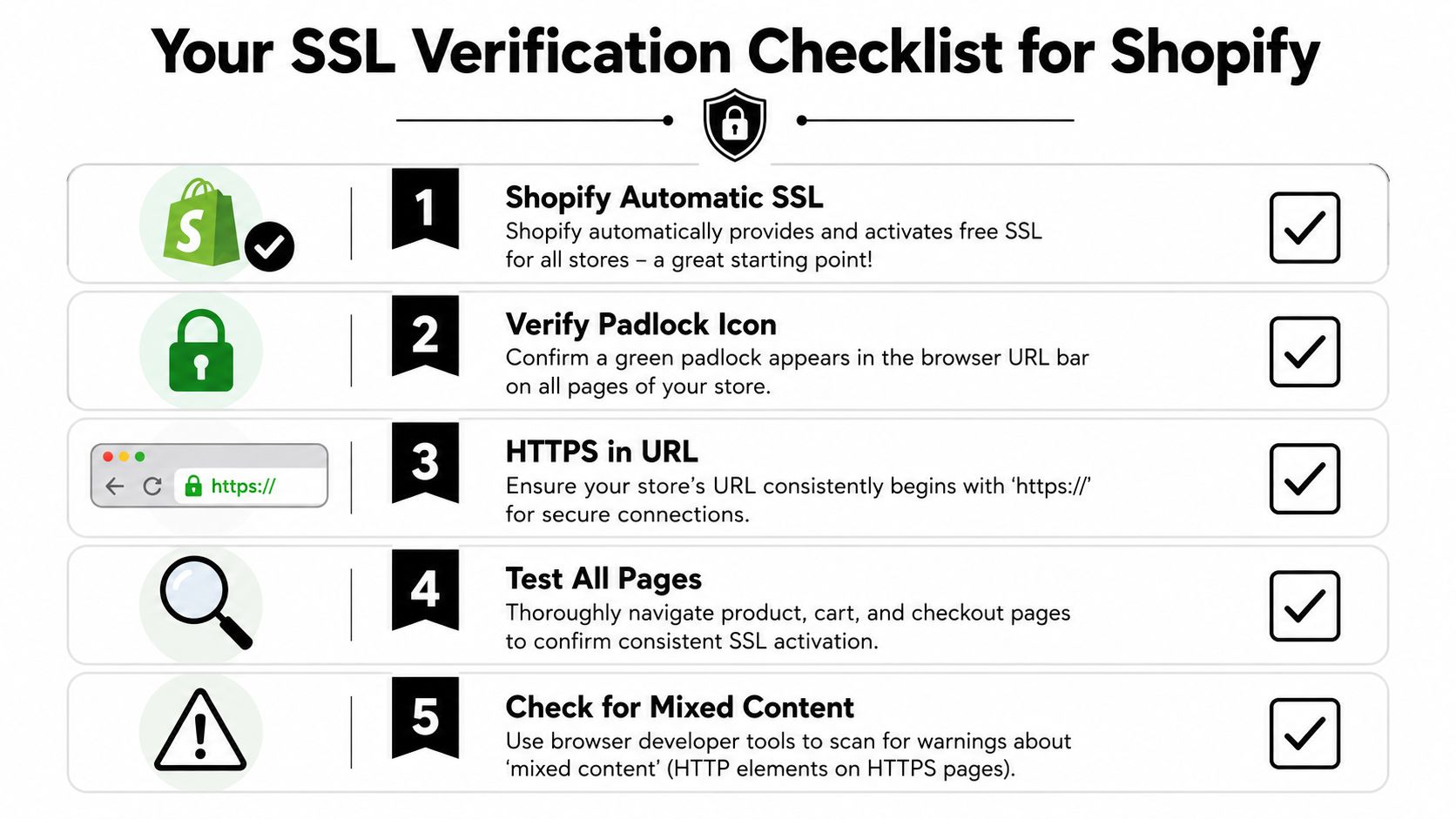
Confirm each page loads with https://. Check that the browser shows a normal secure connection state. Test your root domain, www version, and any custom subdomains you send traffic to.
2. Confirm Shopify domain and SSL status
Shopify provisions certificates for connected domains, but that does not remove the need to verify setup after DNS edits, migrations, redesigns, or domain changes.
Inside Shopify admin:
- Open Settings > Domains.
- Confirm the correct primary domain is active.
- Check that SSL is issued and active for every connected domain customers can reach.
- Review any recent redirects or forwarding rules.
If a domain is pending, misrouted, or partially connected, fix it before you spend another dollar on traffic. Sending paid visitors to a domain with SSL issues is a direct waste of ad budget.
3. Find mixed content before customers do
A page can load over HTTPS and still trigger warnings if an image, script, font, or app asset loads over HTTP. This is one of the fastest ways to make a legitimate store look risky.
Focus your review here:
| Area | What to check | Business impact |
|---|---|---|
| Theme files | Old HTTP asset URLs | Security warnings across multiple pages |
| App embeds | Third-party widgets and scripts | Broken trust on product or cart pages |
| Blog content | Legacy images, video embeds, external assets | Lower trust from top-of-funnel visitors |
| Custom code | Hardcoded HTTP references | Inconsistent browsing and abandoned sessions |
Use browser developer tools if needed, but do not overcomplicate it. If a page throws a warning, treat it as a conversion problem first and a technical cleanup task second.
4. Test the full path to checkout
Do not stop at the homepage.
A store can look fine on the surface and still fail in the moments that matter most, such as account login, cart updates, or post-purchase pages. Those are high-intent touchpoints. If trust breaks there, you do not just lose the order. You increase the odds of customer confusion, support complaints, and disputes later.
Check the journey step by step:
- Landing page to product page
- Product page to cart
- Cart to checkout
- Login, account, and order status pages
- Any page linked in transactional emails or SMS
This is the practical standard. Customers judge security by the entire experience, not by whether your checkout technically encrypts payment data.
5. Add SSL checks to your fraud and dispute workflow
SSL protects the connection. It does not stop stolen cards, account takeovers, or friendly fraud. But weak HTTPS implementation makes those downstream problems worse because it creates doubt, lowers customer confidence, and gives cardholders one more reason to challenge a charge.
Include SSL review in the same monthly process you use for order risk and post-purchase issues. This guide to Shopify fraud prevention strategies for high-risk orders and account abuse is the right next step after you confirm your store is consistently secure.
If chargebacks are already eating into your margin, secure checkout is only half the job. ChargePay helps Shopify merchants recover revenue after disputes hit, with a 92.4% win rate across 200K+ cases and $10.8M+ recovered. It has a 4.9-star rating on the Shopify App Store, carries the Built for Shopify badge, and works on a pay-per-win model, so you only pay when money is recovered. Install ChargePay from the Shopify App Store if you want dispute handling that doesn't turn into another manual task for your team.


.svg)



.svg)


.svg)
.svg)
.svg)