

An ARN (Acquirer Reference Number) is a unique 23-digit code used to trace a card transaction across the entire banking network, from your store to the customer's bank. If you sell on Shopify, think of it as the tracking number for money, especially when a refund goes missing or a customer files a chargeback saying you never paid them back.
A customer emails support. They're angry. You already processed the refund in Shopify, your team can see it, and yet the customer insists nothing showed up on their card. That's the moment most merchants start scrambling through order notes, gateway logs, and bank records.
A lot of stores lose money twice. First on the refund. Then on the chargeback that follows because nobody could prove where the money went fast enough.
The Frustrating Search for a Missing Refund
The usual refund mess looks like this. Your support rep says the refund was sent. The customer says their bank can't find it. Shopify shows “refunded,” but that doesn't calm anyone down because the customer cares about one thing only: where's my money?
Internal order numbers won't save you here. Screenshotting the Shopify timeline usually won't either. Banks don't work off your store's order ID. They need a network-recognized reference they can trace.
Practical rule: If a customer says a refund is missing, stop repeating “we processed it” and start looking for the ARN.
That's why merchants who deal with disputes regularly treat the ARN like operational evidence, not trivia. It gives the issuing bank something usable. It also gives your team a clean handoff instead of a five-email argument with a frustrated buyer.
A strong Shopify refund policy helps before problems start, but once money is already in motion, policy language won't trace a refund. The ARN will.
Why this hits revenue fast
Refund confusion turns into chargebacks fast, especially when the customer thinks you're stalling. And once a chargeback lands, the burden shifts to you. You need proof that stands up outside your own system.
Here's the practical way to understand it:
- Your order ID helps your team find the purchase.
- Your payment gateway record helps confirm you initiated the refund.
- The ARN helps the bank trace the refund across the card network.
That last part matters most when the dispute reason is basically, “I never got the refund.” If you can't produce the network trail, you're arguing from inside your own dashboard. That's weak evidence.
Chargeback work is messy because money disputes are emotional. Customers are stressed. Support is buried. Finance wants reconciliation. The ARN cuts through that noise because it gives everyone the same reference point.
What Exactly Is an Acquirer Reference Number
An Acquirer Reference Number is a network-level transaction identifier tied to a card payment or refund after the acquiring side of the payment flow processes it. In practice, it is the reference banks and processors use to locate the transaction inside the card network, not just inside your Shopify admin or gateway dashboard.
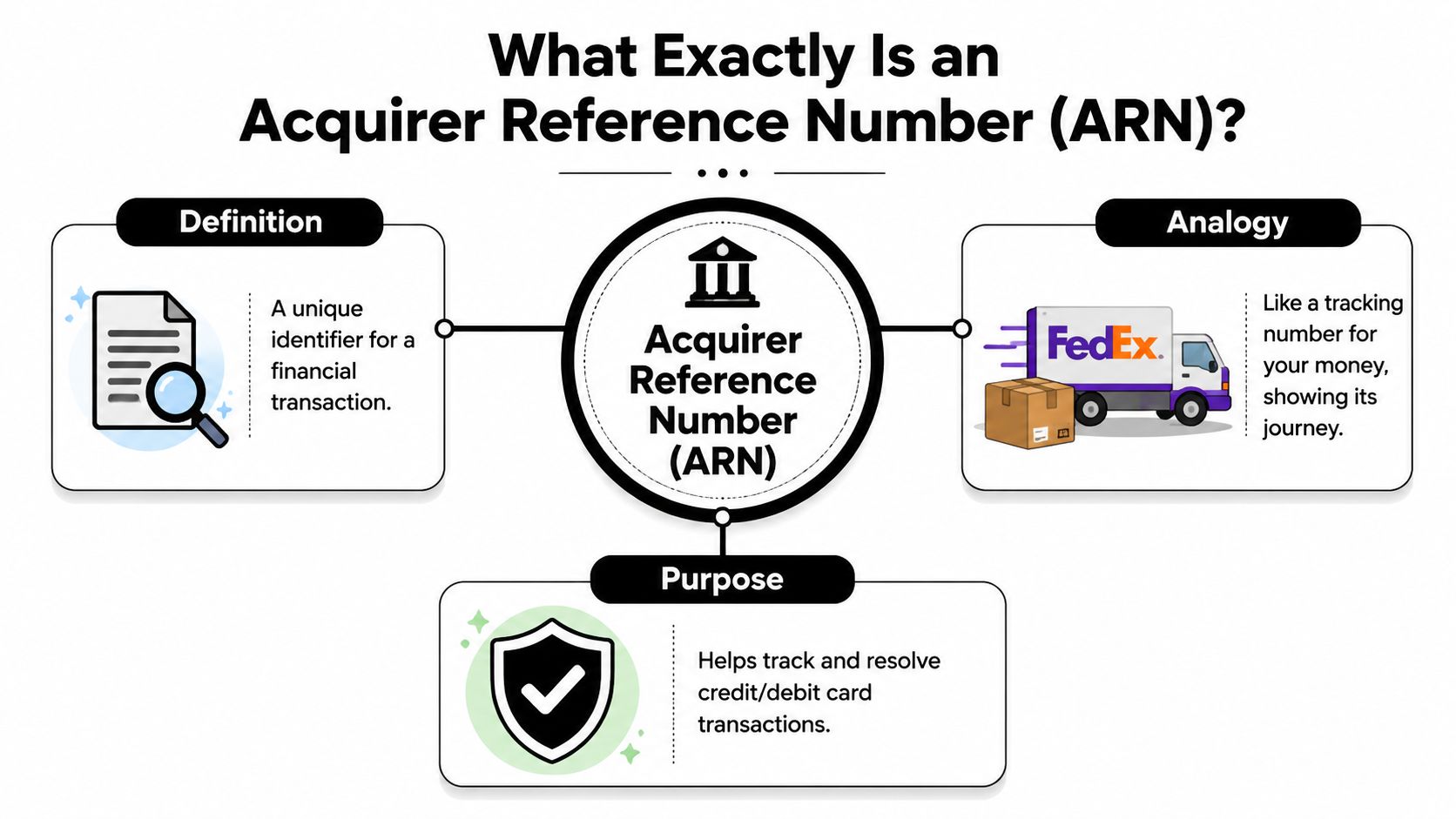
A merchant order number helps your team. An ARN helps the bank.
That distinction is why ARNs matter so much when a customer says, “My bank still doesn't see the refund.” At that point, screenshots from your store are weak evidence. The ARN gives the issuing bank a network reference it can search.
Why merchants should care
Bank definitions usually stop at the label. That is not useful if you are trying to stop revenue from leaking out through refund complaints and avoidable chargebacks.
For a Shopify merchant, the ARN matters because it proves the transaction moved beyond your internal system and into the banking rails. That changes the conversation. Instead of asking a customer to wait and trust you, your support or finance team can give them something their bank can act on.
Use cases are straightforward:
- Refund tracing: The customer's bank can use the ARN to look for the refund in its own systems.
- Dispute defense: You can show the refund was sent into the card network.
- Reconciliation: Finance can match processor activity to the refund record with less guesswork.
- Escalations: Support can hand over a valid network reference instead of repeating the refund confirmation email.
If you handle chargebacks often, treat the ARN as operating proof. It will not replace every document in a dispute, but it gives you a much stronger position when the issue is a missing refund or a customer claiming no credit was received.
For merchants sorting out bank roles, the difference between the acquirer and issuer in card payments explains why the ARN matters. The acquirer sits on your side of the transaction. The issuer sits on the customer's side. The ARN is one of the few references both sides can use to trace the same movement of funds.
Banks cannot trace “Order #10458.” They can trace an ARN.
Where to Find the ARN for a Shopify Transaction
Finding the ARN is usually easy once you know where to look. The problem is that most merchants look in the wrong place first, or they look too early.
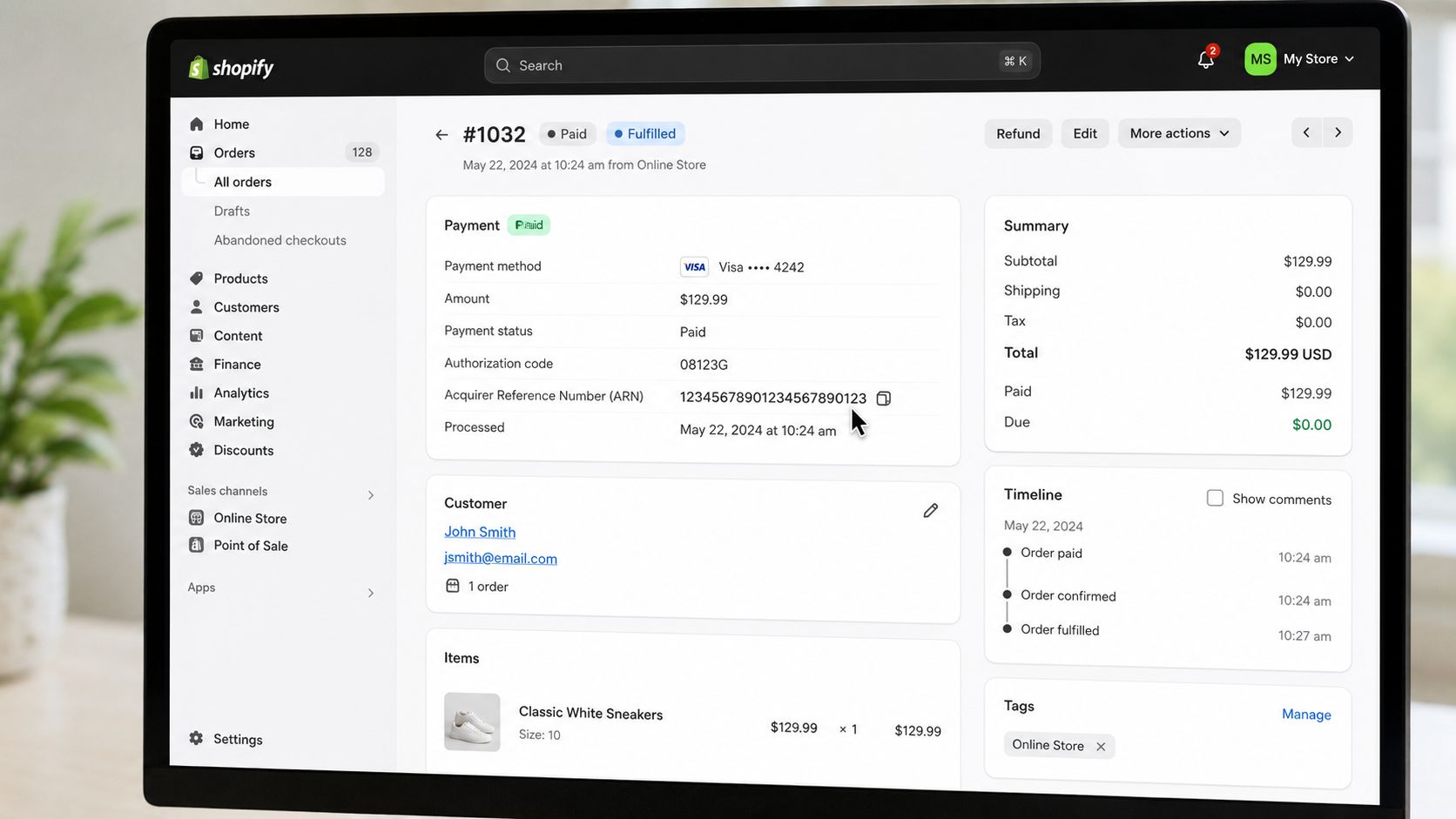
Start with the payment record, not the order record
If you're using Shopify, begin at the order, then drill into the payment transaction details. Don't stop at the customer timeline summary. You need the actual transaction layer.
Look in this order:
Shopify admin
Open the order. Go to the payment or refund details. Check whether Shopify Payments exposes the network reference in the transaction view.Your payment gateway dashboard
If you use Stripe, PayPal, or another processor, open the payment or refund event itself. The ARN is more likely to appear there than in a generic order screen.Acquiring bank or processor support
If the ARN isn't visible, ask your processor or merchant bank for the acquirer reference on that refund transaction.
If your team confuses ARN with a platform-only identifier, fix that first. A transaction ID helps inside the platform where it was created. An ARN helps across the card network.
Why it may not show up right away
Support teams waste time by assuming no ARN means no refund. That's not always true.
Some processors don't display the ARN immediately after the refund is initiated. It can take time for the number to appear in the transaction details. So if your rep refunds at 10:00 a.m. and checks again at 10:03, they may see nothing useful yet.
Use this workflow instead:
- Verify the refund event exists in Shopify or your gateway.
- Wait for the network reference to populate if it's not yet displayed.
- Escalate to processor support only after checking the payment-layer record, not just the order page.
This walkthrough helps if you want to see the flow in a more visual format.
What to tell your team
Don't make ARN retrieval a manager-only task. Train support and finance on it. The faster they can locate the payment trail, the fewer cases will spiral into preventable disputes.
A simple internal playbook works well:
- Support owns the first check: Order view, refund status, customer communication.
- Ops owns the payment lookup: Gateway, processor, ARN retrieval.
- Finance owns the reconciliation question: Whether the refund completed on the acquiring side.
That division saves hours of back-and-forth.
How to Use an ARN to Win Disputes and Trace Refunds
A customer opens a chargeback three days after your team already processed the refund. Now you are stuck proving the money entered the card network before the dispute deadline burns another hour of your week. That is where the ARN starts paying for itself.
The ARN is the piece of evidence banks can trace. Your Shopify refund screenshot is not enough on its own. If you want to recover revenue, stop arguing from your admin panel and start arguing from the network reference tied to the refund.
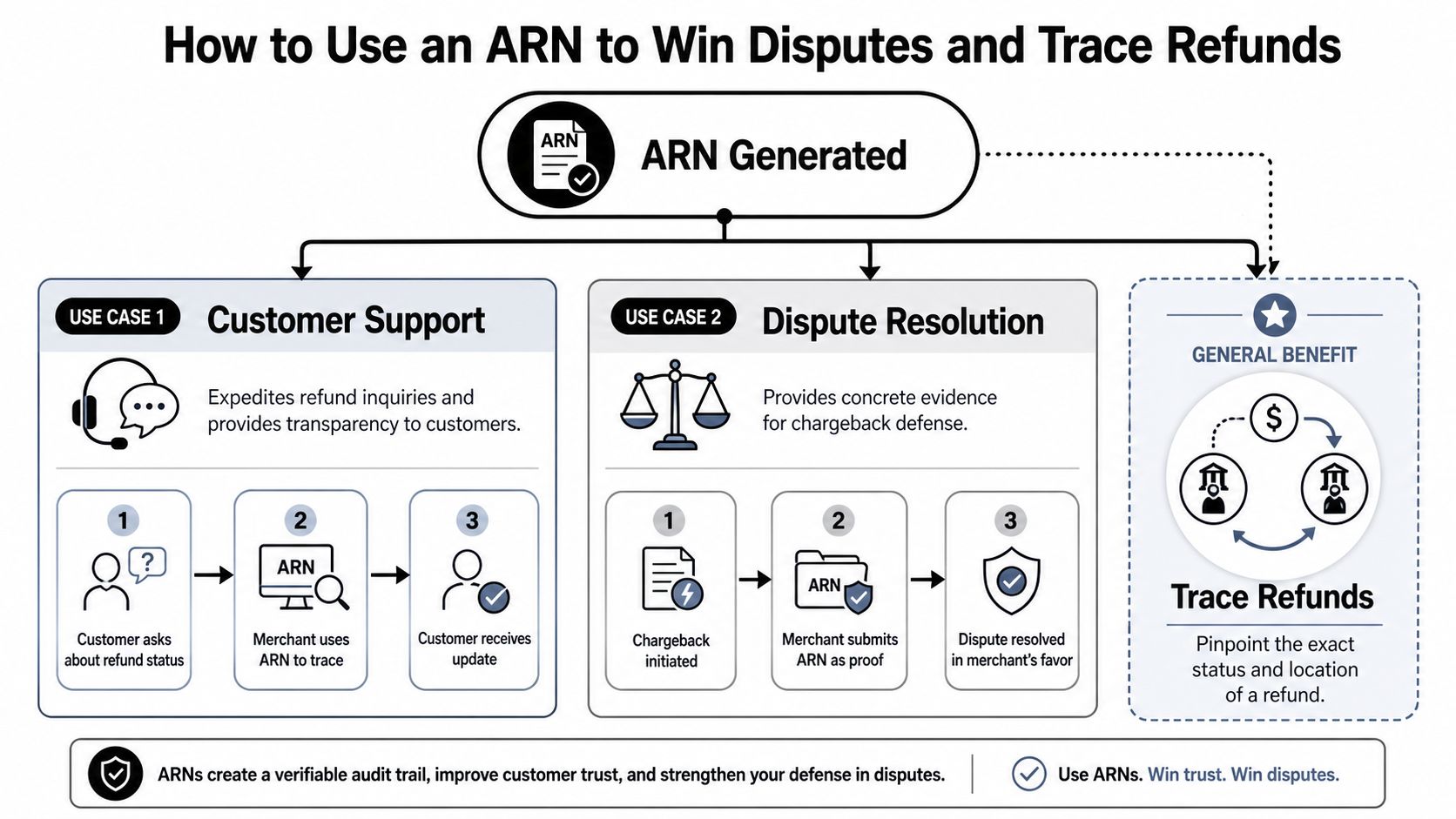
Use it to stop refund complaints from becoming chargebacks
When a customer says the refund never arrived, send a response your bank can stand behind. Confirm the refund date and amount. Pull the ARN. Give the customer that reference and tell them to ask their card issuer to trace the refund using it.
That does two things fast. It shows the customer you processed the refund, and it gives their bank a practical way to find it. Both reduce the odds that a frustrated buyer files a dispute just because support sounded vague.
If your support team can send the ARN on the first serious missing-refund complaint, you will prevent cases that would have turned into avoidable chargebacks.
Use it in representment when the customer disputes after a refund
Here, merchants lose money by being sloppy.
If the refund was issued before the chargeback, put the ARN in the evidence package with the refund date, refund amount, order ID, and customer messages. Banks care about traceable payment evidence. They do not care that your admin panel says "refunded" if the filing lacks a network reference they can check.
Analysts at Checkout.com explain that ARNs help issuers trace refunds and support dispute handling in a way internal records cannot match (how Checkout.com explains ARN in disputes and refunds).
Use that standard. Build your response around verifiable payment trail evidence, not internal screenshots.
A practical playbook for ops, support, and finance
Use the ARN differently based on the problem in front of you:
- Refund issued before dispute: Include the ARN to show the refund entered the card network before the customer filed.
- Customer says the refund is missing: Send the ARN and tell the customer to ask their issuer to trace that exact reference.
- Finance needs reconciliation proof: Match the ARN to the original payment and refund record so your processor, bank, and order data line up.
- You get a retrieval first: Treat it seriously, because the case can escalate fast. Review this breakdown of retrieval requests vs chargebacks so your team responds with the right evidence early.
If you also sell on marketplaces, this same discipline applies outside Shopify. This guide on understanding Amazon seller refunds is useful because weak refund handling creates the same customer confusion, reconciliation mess, and dispute risk.
ChargePay is one option merchants use to automate Shopify chargeback responses and assemble evidence packages faster. If your team is still chasing refund records across inboxes, Shopify, and processor dashboards, that manual process is costing you recoverable revenue.
ARN Timelines and What They Cannot Do
A customer says the refund never arrived. Your support rep sees the refund in Shopify, sends the ARN, and assumes the problem is finished. Then the chargeback lands anyway.
That happens because the ARN is proof of traceability, not proof of settlement. If your team confuses those two things, you create false confidence, missed deadlines, and avoidable revenue loss.

What the ARN can do
An ARN shows the refund has entered the card network and gives the issuer a reference they can trace. That matters because cardholders, support reps, and even some bank agents often talk past each other unless everyone is working from the same network reference.
For a merchant, that means less time arguing about whether the refund was sent and more time building a case that protects revenue.
What the ARN cannot do
An ARN does not force the customer's bank to post the funds immediately. It also does not guarantee the customer will recognize the credit the moment you issue the refund.
There is usually a delay between refund initiation, ARN availability, and final posting on the cardholder's statement. As noted earlier, the ARN may take time to appear. Even after it appears, the issuer still controls how quickly the refund is reflected on the account.
Support teams get in trouble here. They send the ARN and write, “Your money has been returned.” That wording is reckless. If the customer still cannot see the credit, your message becomes evidence that you overpromised.
Use tighter language instead:
- If the ARN just appeared: “Your refund is now traceable through the card network.”
- If the customer wants posting confirmation: “Your bank can trace this refund using the ARN, but statement posting time depends on the issuer.”
- If a dispute deadline is close: Submit the ARN with the rest of your evidence before the chargeback response time limit expires.
The practical rule is simple. Use the ARN to prove movement through the network. Do not use it as a promise that the funds are already visible to the customer.
That distinction wins cases. It also helps you recover revenue that gets lost when a valid refund still turns into a dispute.
ARN Frequently Asked Questions for Busy Merchants
The expensive ARN mistakes are usually simple. A support rep grabs the wrong ID, a customer says the refund never arrived, and a preventable chargeback starts eating margin. If you run Shopify, treat the ARN as a recovery tool, not a piece of payment trivia.
Understanding your transaction identifiers
| Identifier | What It Is | Primary Use Case |
|---|---|---|
| ARN | A network-recognized reference for a card transaction or refund | Tracing refunds and supporting disputes across banks |
| Transaction ID | A platform or gateway-specific payment identifier | Looking up activity inside Shopify, Stripe, PayPal, or another system |
| Chargeback ID | A dispute case reference assigned to the chargeback itself | Managing the dispute workflow with the processor or issuer |
Is ARN the same as a transaction ID
No. A transaction ID helps your team find the payment inside your own systems. An ARN helps the customer's bank trace the refund through the card network.
That difference matters in real disputes. If a customer claims the refund never showed up, sending a Shopify or gateway transaction ID often does nothing. Sending the ARN gives the bank something it can trace.
What if I can't find the ARN
Check the refund transaction details first. Do not rely on the customer-facing order timeline.
If it is not there, check the payment gateway or processor dashboard. If it is still missing, ask the processor or acquiring bank for the refund reference. Also, give it a little time if the refund was just issued. ARNs are not always available immediately.
Why are search results talking about Indian finance
Because ARN has another meaning. In Indian mutual funds, it can mean Application Reference Number.
That is not the ARN you need for Shopify refunds, chargebacks, or card settlement questions. Merchants need Acquirer Reference Number. If your team searches the wrong term, they waste time and delay a customer answer that could have stopped a dispute.
When should support give the ARN to the customer
Give it as soon as the refund has been initiated and the ARN is available. Waiting for the conversation to turn angry is bad operations.
Use a short message the customer can forward to their bank. Tell them the ARN is the reference their bank can use to trace the refund. That keeps the conversation focused on verification instead of accusations.
Do I need to store ARNs
Yes. Store them with your refund records whenever your payment setup provides them.
This saves time later. More important, it gives your team a stronger paper trail when a refunded order still comes back as a chargeback. Good ARN recordkeeping helps you respond faster, prove the refund moved through the network, and recover revenue that would otherwise stay gone.
If your Shopify store keeps losing time and money to refund disputes, ChargePay handles the dispute workflow for merchants who do not want to collect and submit evidence by hand every time a refunded order turns into a chargeback.


.svg)



.svg)


.svg)
.svg)
.svg)