


A chargeback email lands in your inbox between fulfillment updates and customer messages. The order looked normal when it came in, but now the bank wants proof, and one small acronym starts to matter fast: TID.
For Shopify merchants, that confusion is expensive. "TID" can mean different things in different payment conversations, and a lot of articles blur them together. This guide stays focused on the two TID meanings that help you recover revenue: the identifier tied to where the transaction was processed, and the transaction reference details that help connect a disputed payment back to a real checkout event.
A TID, often short for Terminal ID, is the code that identifies the payment setup used for a sale. It works like a store register number in a physical shop. If someone questions a purchase, that number helps show which approved checkout environment processed it. In a chargeback dispute, that kind of trace matters because banks want records that connect the order, the payment, and your store's payment configuration.
If you are trying to understand what is tid, the practical answer is simple. It is one of the details that helps turn "we believe this order was legitimate" into evidence a bank can review. That is why merchants who understand their TIDs are usually in a better position to respond quickly, submit cleaner evidence, and recover more of the revenue that chargebacks would otherwise take.
That Confusing 'TID' on Your Chargeback Notice
A dispute email hits while you are checking orders, answering customer questions, and trying to keep fulfillment on track. You open it, scan the reason code, and then your eye catches one small term: TID.
That moment throws a lot of Shopify merchants off. The order may look familiar. The customer name may ring a bell. But banks do not rule on familiarity. They rule on records that connect a disputed charge to a real payment event.
That is why TID shows up so often on chargeback paperwork.
Why the bank cares about TID
A bank reviewing a dispute is doing a matching exercise. It wants to see whether the payment can be traced back to your approved checkout setup and to the specific transaction being challenged. A TID helps build that chain.
For merchants, the easiest way to understand it is this: one TID points to the payment environment that processed the sale, and another related reference can point to the individual transaction itself. If you want a cleaner explanation of that second piece, this guide on what a transaction ID means in payments fills in the gap.
The bank does not need your whole business story. It needs a short chain of proof that holds together.
A Terminal ID works like a register number in a physical store. If a shopper disputes a card purchase, the register number helps show where the payment was accepted. In Shopify, the idea is similar even though the sale happened online. The record helps tie the charge back to your payment setup, gateway path, and checkout event.
That detail can change the quality of your response. Instead of sending a general statement that says the order looked legitimate, you can submit evidence that is easier for an issuer to verify.
Merchants also get confused because "TID" gets used for several different things across software, telecom, and payments. For chargebacks, you can ignore the noise. The only meanings that matter here are the two that help you prove a real sale happened through your store and give the bank a clearer path to rule in your favor.
If you are improving your store operations with Refact's Shopify services, this is one of those payment details worth keeping organized early. Clean transaction records make disputes easier to fight later.
Understanding TID is not about learning processor jargon for its own sake. It is about recovering revenue that would otherwise stay gone.
What a TID Actually Is for Your Shopify Store
You will see a lot of conflicting answers if you search "what is TID." For a Shopify merchant dealing with disputes, only two meanings matter: Terminal ID and Transaction ID. Those are the two identifiers that help you connect a disputed charge to a real payment record and give the bank a cleaner trail to verify.
The easiest way to separate them is to treat them like two parts of the same receipt trail.
A Terminal ID points to the payment environment that processed the charge. A Transaction ID points to the single payment event for that order. One tells you where the payment came through. The other tells you which payment you are talking about.
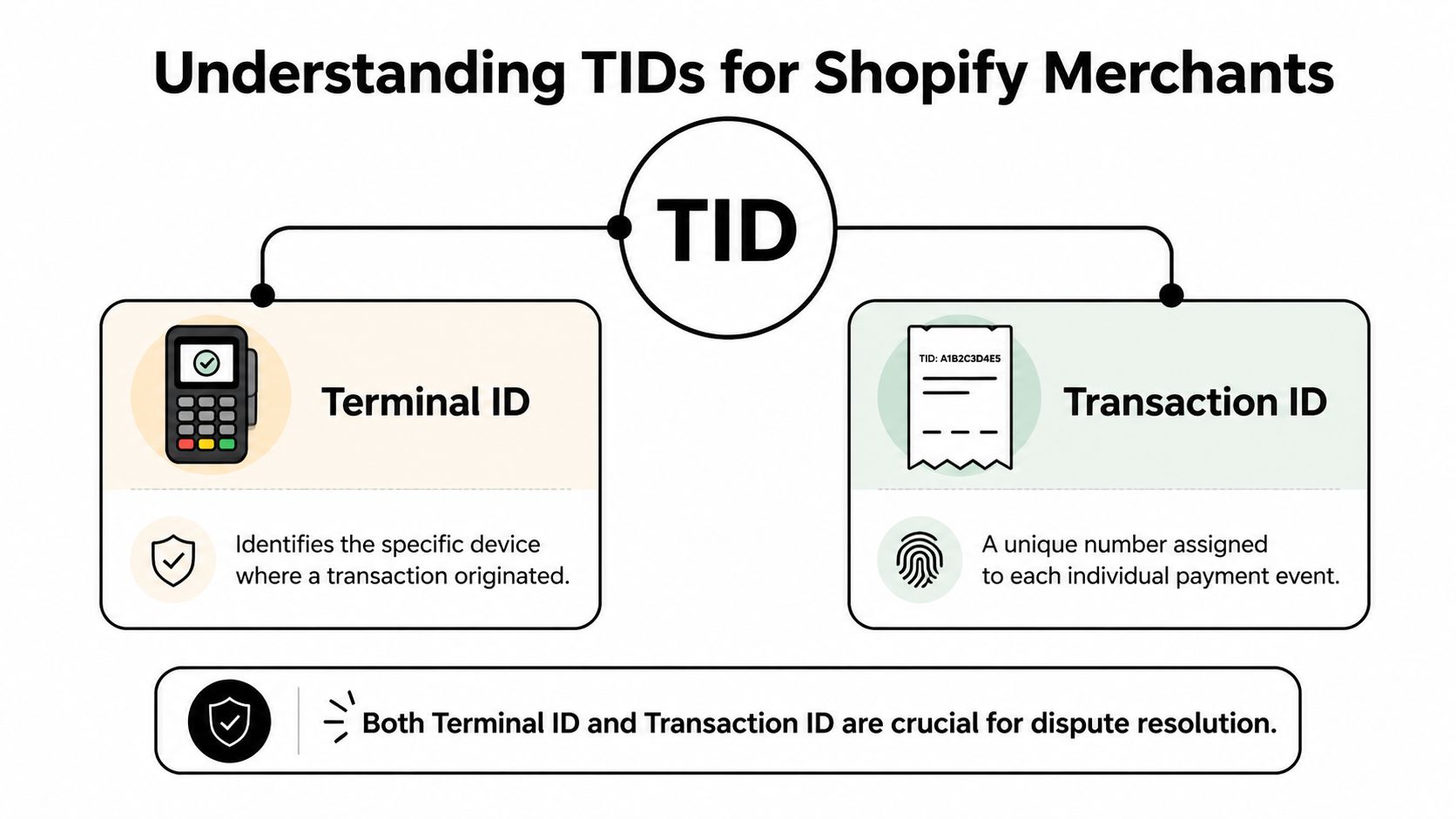
Terminal ID means the payment origin
A Terminal ID Number is the identifier attached to the terminal or processing environment that accepted the payment. In a physical store, that can mean a specific card reader or register. In Shopify, it usually maps to the processor setup, gateway path, or merchant processing environment behind your checkout.
That matters because chargebacks are not won with broad claims. They are won with records the issuer can trace. If you can show that the disputed charge came through your normal, registered payment setup, your evidence becomes easier to follow and harder to dismiss.
Transaction ID means the specific sale
The Transaction ID is the unique reference for one payment event. If the same customer places multiple orders, each payment should have its own transaction record with its own ID. That is the record you use to match the dispute to the authorization, amount, status, and timing in your processor logs.
If you want a deeper explanation of that identifier, ChargePay has a plain-English guide on what a transaction ID means in payments.
Why the two get mixed up
The confusion usually starts because Shopify, your payment processor, and the bank notice may all label payment references differently. A dashboard might show an order number first. Stripe or PayPal might highlight a charge ID. The dispute notice may surface only part of the payment trail.
That does not mean the records are missing. It means you are looking at the same sale from different systems.
Here is the practical way to keep them straight:
- Terminal ID: identifies the payment source or processing environment
- Transaction ID: identifies the exact payment event
- Merchant ID: identifies your business account with the processor
If you remember just one thing, remember this. Terminal ID answers "through which setup?" Transaction ID answers "which charge?"
That distinction helps you build a dispute response that reads like proof, not guesswork. And if your store has custom checkouts, subscriptions, or more than one sales channel, clean payment mapping matters even more. Merchants sorting out those technical layers often get help from Refact's Shopify services so payment records stay easier to trace when revenue is on the line.
Why TIDs Are Your Secret Weapon Against Chargebacks
A chargeback notice lands in your inbox. You know the order was real, the package went out, and the customer used your checkout. The problem is not what happened. The problem is proving it in a way the bank can follow quickly.
That is where TIDs become revenue tools, not just payment jargon.
For Shopify merchants, this guide focuses on the two TID meanings that help in disputes. Terminal ID and Transaction ID. One helps show which approved payment setup handled the sale. The other points to the exact payment event. Together, they give your evidence a clear spine.
What TIDs help you prove
Chargeback reviewers do not see your business the way you do. They see fragments from different systems. An order record in Shopify. A payment record in your processor. A claim from the cardholder’s bank.
TIDs work like matching labels on those fragments. They help connect the pieces into one story that is easy to verify.
A Terminal ID shows the payment came through your legitimate processing environment. A Transaction ID ties the dispute to the specific authorization, capture, or sale record. If a cardholder claims the purchase was not authorized, those identifiers help show the charge was part of your normal checkout flow, not some unexplained event.
Why IDs carry more weight than screenshots
Screenshots are helpful context. They are rarely the strongest proof on their own.
Banks and card networks prefer evidence that maps back to processor records. TIDs do that cleanly. Instead of asking the reviewer to trust a screenshot, you give them references they can match against the payment trail. That changes your response from a general explanation into a verifiable record.
It is the difference between handing someone a photo of a package and handing them a tracking number.
If your team pulls processor data from Stripe, tools connected through stripe mcp can also make those records easier to surface and organize during a dispute review.
Where TIDs help most in common disputes
TIDs do not win a case by themselves. They make the rest of your evidence harder to dismiss.
They are especially useful when you need to show consistency across systems:
- Unauthorized transaction claims: the payment can be tied back to your approved processing setup and a specific charge record
- Multiple similar orders: the Transaction ID separates one payment event from another
- Different sales channels or payment setups: the Terminal ID helps show which environment handled the order
- Messy evidence packets: matching identifiers reduce contradictions between Shopify, your gateway, and the bank-facing dispute file
That consistency matters because chargebacks are often lost on small breaks in the chain. A missing reference here. A mismatched amount there. TIDs help close those gaps.
Strong evidence also works better when fewer disputes happen in the first place. If you want to reduce incoming claims as well as improve win rates, pair this with stronger chargeback prevention practices such as clearer billing descriptors, faster support, and better post-purchase communication.
The bank does not need every detail about your store. It needs a short, consistent chain of proof.
Finding Your TIDs A Practical Guide
Knowing what a TID is helps. Finding it quickly is what saves time when a deadline is close.
In practice, your payment identifiers may live in more than one place. Shopify often gives you the order timeline and payment references. Your gateway or processor usually holds the deeper transaction record. If you use multiple tools, expect to hop between them.
Here’s the Shopify order view many merchants use to start that search.
Start inside Shopify
Open the order tied to the dispute. Then check the order timeline, payment section, and any gateway reference attached to the charge. Shopify may not always label something as “TID,” but it often shows the reference you need to match against your processor.
Use this order for a simple matching workflow:
- Find the disputed order in Shopify admin.
- Open the payment details and note any transaction reference.
- Check the order timeline for payment events, captures, or authorizations.
- Match that record inside Stripe, PayPal, or your payment processor.
- Pull the processor-side identifiers used in the dispute evidence.
If your support or operations team also needs order context, tools that improve post-purchase communication can help reduce confusion before a dispute ever starts. ChargePay’s guide on order confirmation workflows is useful for tightening that side of the process.
Where to look by platform
The labels change from platform to platform, so a quick reference helps.
| Platform | Location | What It's Called |
|---|---|---|
| Shopify | Order page and timeline | Transaction reference or payment event details |
| Stripe | Payment record in dashboard | Transaction ID or charge ID |
| PayPal | Activity or transaction details | Transaction ID |
| POS system | Terminal or device settings, processor dashboard | Terminal ID |
If your team handles a lot of Stripe payments and wants cleaner data access across tools, stripe mcp is worth reviewing because it focuses on connecting Stripe data into broader operational workflows.
What to do if you can’t find a clear TID
Sometimes merchants assume the ID is missing when it’s really just named differently.
Try these checks:
- Look for gateway references: Shopify may show a payment reference that maps to the processor’s transaction record.
- Check both authorization and capture records: Some flows create more than one payment event.
- Review processor exports: Bulk exports often include identifiers that the interface hides.
- Ask your payment provider support team: They can usually confirm which field maps to the terminal or transaction identifier in dispute documentation.
If you can match the order, the payment event, and the processor record, you usually have what the bank needs even if the label isn’t literally “TID.”
TID in Action Real Examples and Troubleshooting
Theory helps. Real dispute situations make the value of TIDs much clearer.

Example one with an unauthorized transaction claim
A Shopify apparel merchant gets a chargeback for an order the customer says they never approved. The merchant checks Shopify, finds the order payment reference, then matches it to the processor’s transaction record.
From there, the evidence package becomes much stronger. The merchant can tie the order to a specific transaction record and show that the payment moved through the store’s normal checkout path, not through an unknown source. The TID doesn’t replace other evidence like shipping confirmation or customer history, but it anchors the entire timeline.
That matters because a clean processor record is hard to dismiss. It gives the issuer a concrete way to verify the sale.
Example two with multiple store locations
Now take a merchant that sells in person at more than one location. A customer disputes a purchase and claims they were never at the store where the sale supposedly happened.
The merchant checks the terminal records and identifies the Terminal ID used for that payment. That lets them show which registered terminal processed the sale. If the business has several devices or locations, that detail can resolve confusion that would otherwise make the response look vague.
In a case like this, the TID is useful because it narrows the event to one specific payment source. That’s much stronger than saying, “The charge happened somewhere in our business.”
Common troubleshooting problems
Merchants usually run into the same few issues:
- The ID appears missing: It may be listed under a processor-specific label instead of TID.
- The order has multiple payment events: Make sure you’re using the disputed event, not a prior authorization or retry.
- The processor aggregates records: Some systems group transactions in ways that make the terminal less obvious. In those cases, pull the most detailed record available from the gateway.
- The evidence feels disconnected: Build your response around one timeline. Order placed, payment processed, transaction record matched, fulfillment completed.
If you need help structuring that response itself, seeing a worked example of a chargeback rebuttal letter can make the evidence easier to organize.
When merchants lose good disputes, it’s often because the proof was scattered, not because the sale was illegitimate.
How ChargePay Turns TID Data into Won Disputes
Manual dispute work breaks down fast. You have to find the right order, confirm the processor record, pull the identifiers, draft the response, and submit everything before the deadline. Even if you know what a TID is, doing that repeatedly is hard when you’re also running a store.
That’s where automation changes the outcome.

What automation fixes
Instead of hunting through Shopify and payment dashboards for every case, an automated chargeback system can gather the payment evidence for you and package it in a bank-ready format. That includes pulling the identifiers that connect the sale to the processor record.
ChargePay is built for that exact job. It’s an AI-powered chargeback management app for Shopify merchants that handles the dispute lifecycle from alert to resolution. The platform reports a 92.4% win rate across 200K+ cases and $10.8M+ recovered, and it has a 4.9-star rating plus the Built for Shopify badge, according to ChargePay’s publisher information.
Why that matters for TID evidence
TID data is useful only if it gets into the dispute response correctly and on time. Automation helps in two ways:
- It reduces missed evidence: The right identifiers are less likely to get overlooked.
- It speeds up submissions: Faster responses matter when card network deadlines are fixed.
If you want to see how the platform handles that workflow, the ChargePay product page shows how the app connects chargeback evidence, AI-generated representment, and submission into one system.
For busy merchants, the benefit isn’t just convenience. It’s consistency. Consistent evidence packages give you a better shot at recovering revenue without turning every dispute into a manual research project.
Stop Letting Chargebacks Steal Your Revenue
By now, that strange three-letter acronym should feel a lot less mysterious. In the payments world, TID is part of the proof trail that helps connect a disputed charge to a real payment event in your store.
That matters because chargebacks often punish merchants who did everything right but can’t pull the evidence together fast enough. Once you understand how Terminal IDs and Transaction IDs support that record, you’re in a better position to respond with confidence instead of scrambling through dashboards.
Good systems help before the dispute too. If you’re reviewing your customer communication stack, resources on AI tools for e-commerce support can help you tighten service flows that reduce confusion-driven disputes in the first place.
Manual work doesn’t scale. Orders increase, payment tools multiply, and evidence ends up scattered across platforms. The merchants who recover more revenue usually aren’t the ones working longer hours. They’re the ones using better processes and better tooling.
If you’re tired of losing money to chargebacks, ChargePay can do the heavy lifting for you. It automatically collects evidence, builds dispute responses, and submits them on time for Shopify merchants. With a 92.4% win rate, 200K+ cases handled, $10.8M+ recovered, a 4.9-star rating, and a Built for Shopify badge, it’s built to turn chargebacks into recoverable revenue. Install ChargePay from the Shopify App Store and let the system fight for your money.


.svg)



.svg)


.svg)
.svg)
.svg)