


You're probably seeing it already. New subscriptions come in, retention looks decent at first glance, then failed renewals start piling up. Customers didn't cancel. Their card changed, the rebill failed, and your store lost revenue.
That problem gets mislabeled all the time as churn, weak product-market fit, or soft demand. In a lot of Shopify stores, it's simpler than that. The payment credentials on file are stale. Visa Account Updater exists to fix exactly that.
The Silent Revenue Killer Hiding in Your Subscription Metrics
A common Shopify pattern looks like this. Your team launches subscriptions, memberships, replenishment orders, or auto-renew plans. Month one is strong. Month two looks fine. Then support starts seeing “why did my order stop?” emails, and your billing dashboard fills up with failed renewal attempts.
That's not always a customer loyalty issue. A lot of the time, it's a card file issue.
According to Visa, as many as 30% of card declines in recurring billing environments are due to expired or replaced cards, and Mastercard reports that up to 25% of subscription churn is involuntary, primarily from failed payment attempts due to outdated card details in this breakdown of recurring billing failures.
Why this hits Shopify stores so hard
Shopify merchants feel this problem faster than most because recurring revenue compounds. One failed rebill doesn't just lose a single order. It can break the customer habit, trigger support work, and create a gap that's hard to recover.
If you run subscriptions, replenishment, memberships, or installment-style billing, stale cards can distort your metrics in three ways:
- Churn looks worse than it really is because some customers never intended to leave.
- Retention work gets misdirected because your team tries to fix messaging instead of fixing billing.
- Disputes can follow the failure when customers get confused by retries, interruptions, or delayed rebills.
Practical rule: If your subscription churn rises while customer satisfaction looks stable, check failed payments before you rewrite your retention strategy.
If you're already working on retention, Halo AI's churn reduction guide is worth reading because it helps separate real customer loss from avoidable billing friction.
For more subscription-specific payment and dispute issues, ChargePay's subscription chargeback articles are also useful background reading.
What visa account updater actually changes
Visa Account Updater, usually called VAU, is the fix for this specific leak. It helps merchants keep card-on-file details current when a card expires or gets replaced.
That matters because many “lost” subscribers aren't lost at all. They're blocked by an old card number or expired date sitting inside your payment system.
You don't need more discount emails to solve that. You need the payment details updated before the next bill runs.
How Visa Account Updater Magically Updates Expired Cards
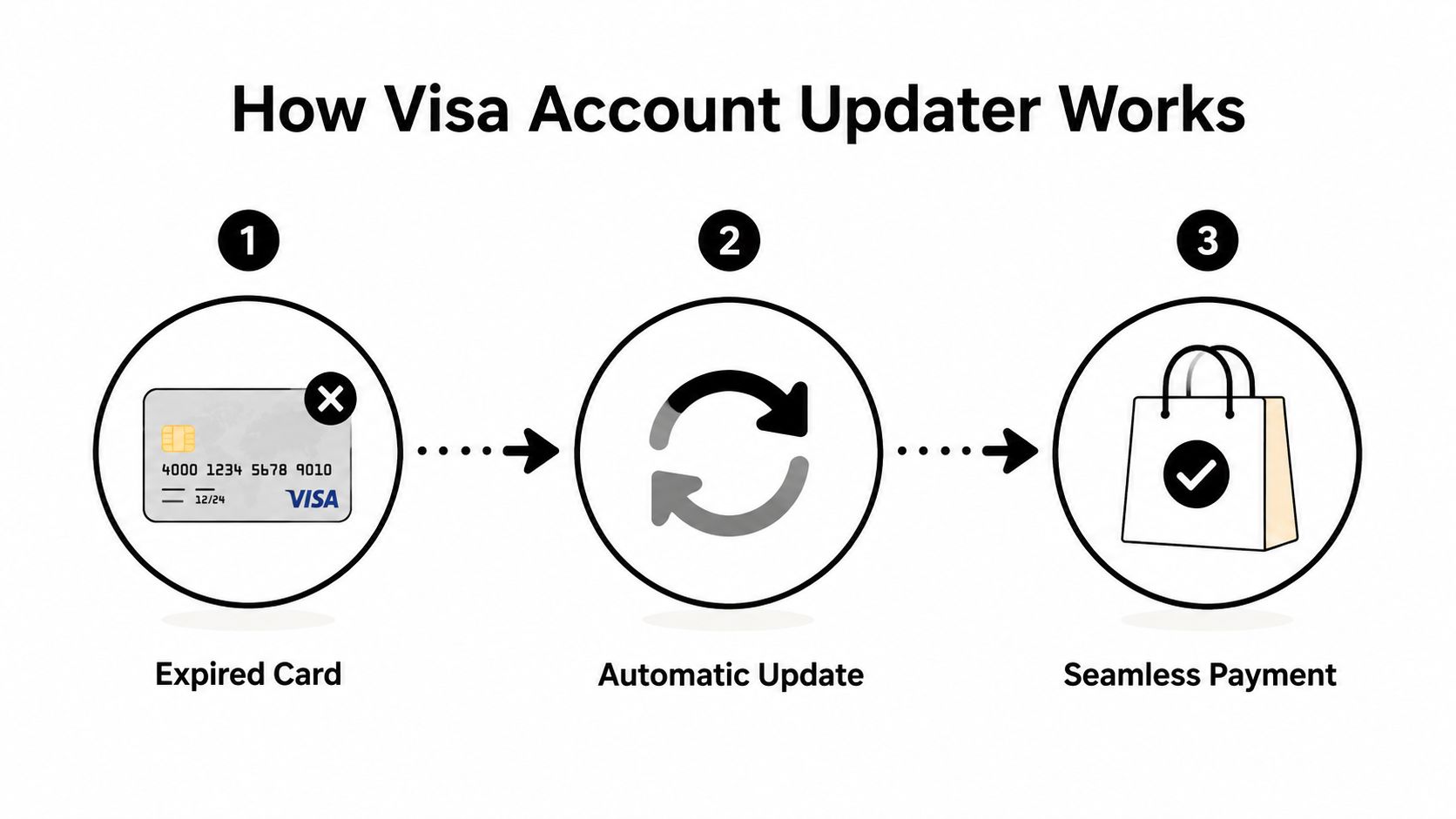
The easiest way to think about visa account updater is this. It works like mail forwarding for stored card details.
A customer gets a replacement Visa card because the old one expired, got lost, was reissued after fraud, or changed during a product upgrade. Your store still has the old credentials on file. Without an updater, your next recurring charge hits outdated data and declines. With VAU, the updated information can be passed back through the payments chain so you can bill the new card details instead.
The plain-English workflow
Here's what happens behind the scenes:
- Your payment provider or acquirer checks stored card credentials for customers with an ongoing card-on-file relationship.
- Visa checks for issuer-submitted updates tied to those credentials.
- Updated account information is returned if there's a valid change available.
- Your billing system needs to refresh the stored details before the next authorization attempt.
Visa's developer documentation explains that acquirers can use several protocols for VAU, and they must forward responses to merchants within two business days so merchants can update on-file accounts before the next authorization attempt in Visa's VAU capability overview.
What kinds of updates come back
VAU isn't just about expiration dates. It can return a small set of specific outcomes that matter for billing decisions.
- New account number when a replacement card has been issued
- New expiration date when the card has been renewed
- Closed account advice when the old account shouldn't be billed
- Contact cardholder advice when the issuer wants the customer contacted instead of automatically updating the credentials
That last one matters more than most merchants realize. Sometimes the system won't hand you a fresh replacement automatically. Instead, it signals that the customer should be contacted. That's a useful operational flag, not an error.
If your gateway supports account updater services but your retry logic still uses old credentials, you're paying for a fix you aren't actually using.
Why merchants like it even if they never see it
VAU works best when you barely notice it. The customer doesn't have to stop what they're doing and re-enter card details across every merchant they buy from. Your team doesn't have to chase expired cards manually. Billing keeps moving.
That is the actual value. Not the technical feature itself, but the fact that fewer good customers get dropped from recurring revenue over something administrative.
For a Shopify merchant, this is one of those rare payment improvements that solves a backend problem customers feel immediately when it's missing.
The Real Impact on Your Shopify Store's Bottom Line
Technical payment tools only matter if they rescue money. Visa account updater does.
Merchants using account updater services see up to 20% higher recurring payment success, according to this ROI overview of account updater services. That matters because recurring billing failures don't just create noise in your payments dashboard. They remove revenue you already earned once by acquiring the customer.

The money shows up in three places
The first impact is obvious. More rebills go through.
The second impact is operational. Failed recurring charges create extra customer service work. Someone has to email the customer, explain what happened, ask for updated payment details, and hope they complete the process. Account updater services cut that manual cleanup.
The third impact is accounting clarity. Your subscription revenue gets less distorted by avoidable payment failures, which makes forecasting and reconciliation cleaner. If your finance side is messy, this practical guide to Receipt Router for Shopify bookkeeping can help tighten the back office around the payments data you're already collecting.
What this means for a Shopify operator
You should treat VAU as a revenue recovery tool, not just a payment setting.
Here's the practical effect:
- Recovered renewals mean more customers stay active without extra ad spend.
- Fewer support tickets mean your team spends less time fixing preventable billing issues.
- Cleaner retention data means you can tell the difference between actual churn and payment friction.
A lot of merchants pour attention into top-of-funnel growth while ignoring billing maintenance. That's backwards. If your subscription engine leaks because stored card data is old, every acquisition dollar becomes less efficient.
The cheapest revenue to recover is the payment that should've succeeded in the first place.
If you're also tightening your broader dispute workflow, ChargePay's guide to chargeback prevention for ecommerce is a strong companion read because payment recovery and dispute prevention usually live in the same operational mess.
My recommendation
If you sell on subscription or rely on repeat stored-card billing, turn on account updater support through your payment stack and make sure your retry flows use the updates. Don't treat failed renewals as normal attrition. A chunk of that loss is technical, preventable, and worth fixing immediately.
Getting Started with VAU on Your Shopify Store
Most Shopify merchants don't need to install visa account updater as a separate app. In practice, it's usually handled through the payment provider, processor, or gateway you already use.
That's good news because this isn't a project you should overcomplicate. Your primary task is confirming whether it's active, how updates flow into your billing system, and whether your rebill process uses the refreshed credentials correctly.

Questions to ask your payment provider
Don't ask vague questions like “Do you support Visa?” Ask operational questions that get clear answers.
- Is account updater enabled for my Shopify store? You want a yes-or-no answer, not a generic feature list.
- Which card updater services are included through my gateway? Some providers bundle multiple network updaters together.
- How are updates applied to stored payment methods? If the update exists but doesn't reach your billing system properly, you still get declines.
- What happens before the next recurring authorization attempt? Timing matters.
- Does my subscription app or billing setup use the refreshed credentials automatically? Many stores assume too much regarding this part of the process.
What to verify inside your stack
A lot of stores assume the gateway handles everything. Sometimes it does. Sometimes there's a gap between the payment processor, the subscription app, and the actual retry flow.
Check these areas:
Stored credential handling
Make sure your recurring billing tool is using the latest card data made available by your provider.Retry logic
A smart dunning sequence helps, but it only works if it's retrying against updated credentials rather than the stale card.Subscription platform behavior
If you use Shopify subscriptions or a third-party billing app, confirm how card updates are synced.Support workflow
Your customer service team should know when to wait for updater-driven recovery and when to contact the customer directly.
Ask your provider for the exact path an updated Visa card takes from issuer update to your next subscription charge. If they can't explain it clearly, escalate.
Keep the setup boring
That's the goal. You want this to run in the background.
Your team shouldn't be exporting card files, manually updating accounts, or piecing together payment records after every reissue event. If the provider supports account updater services, your job is to verify it's active, confirm the data reaches your recurring billing flow, and then monitor failed payment reasons for improvement.
If you want a broader view of payment recovery, fraud, and dispute handling across Shopify, ChargePay's solutions for ecommerce payment and dispute operations give a good map of where updater tools fit and where they don't.
VAU vs Other Card Updater Services
Visa account updater is not the only updater service in payments. It's Visa's version of a broader category.
That's important because your customers don't all use Visa cards. A serious Shopify setup needs coverage across card networks, not just one brand.
Card network account updater services
| Card Network | Service Name | Primary Function |
|---|---|---|
| Visa | Visa Account Updater | Updates stored card details for eligible card-on-file billing when account information changes |
| Mastercard | Automatic Billing Updater | Updates stored billing credentials for recurring and card-on-file transactions |
| American Express | Card Refresher | Refreshes card-on-file details when eligible account information changes |
What actually matters to you
You usually don't need to integrate with each service one by one. In many setups, the payment provider handles the network relationships and routes the updates through its own infrastructure.
That means your decision is less about picking Visa Account Updater versus something else. It's about checking whether your gateway supports updater services across the cards your customers use.
Here's the blunt version:
- If your provider supports network updater services well, card changes create fewer failed renewals.
- If support is partial or poorly connected to your subscription flow, you still lose good revenue even though the feature technically exists.
- If you don't know what's enabled, you're operating blind.
Don't confuse updater coverage with chargeback protection
Merchants often face challenges here. Card updater services help with billing continuity. They do not replace fraud tools, order evidence, customer communication, or chargeback workflows.
If you're sorting out processor-level protections too, this explainer on Stripe chargeback protection for Shopify stores helps clarify where payment infrastructure support ends and dispute management begins.
My advice is simple. Ask your gateway which updater services are included, test whether recurring billing improves, and don't assume “supported” means “working well.”
VAU Stops Declines But Not All Chargebacks
This is the part merchants need to get straight. Visa account updater is useful, but it is not a chargeback shield.
It helps prevent one specific mess. A recurring charge fails because the card on file is outdated. That failed payment can create customer confusion, interrupted service, account access issues, or messy retry behavior. In some cases, those situations can feed a friendly fraud dispute later. VAU reduces that risk because it keeps valid card details current.
It can also help on defense. Visa's updater framework can support representment in certain cases because merchants can show updated card information was accessible, which helps demonstrate the cardholder maintained control over the payment method. The system's Contact Cardholder Advice can also create an audit trail showing notification occurred, as explained in this Visa Account Updater FAQ summary.
What VAU helps with
VAU is strong at the front end of the problem.
- Outdated card declines on recurring or card-on-file billing
- Involuntary churn caused by expired or replaced cards
- Some evidence support when a dispute touches updated payment credentials or cardholder control
What VAU does not solve
It won't help much when the dispute is about the order itself.
It doesn't stop claims like:
- Item not received
- Product not as described
- Unauthorized transaction claims unrelated to stale credentials
- Deliberate friendly fraud after fulfillment
- Operational mistakes like duplicate charges or bad cancellation handling
A merchant can do everything right on card updates and still lose money on post-purchase disputes.
That's why payment recovery needs layers. First, stop avoidable declines. Second, fight the disputes that still happen.
My recommendation for Shopify stores
Turn on account updater support if your payment stack offers it. That's the prevention layer. Then treat chargeback management as a separate system with its own evidence, automation, and deadlines.
If your store is already seeing disputes pile up, it's worth understanding how card network pressure escalates at the portfolio level too. ChargePay's article on the Visa chargeback monitoring program is useful context for what happens when dispute rates keep climbing.
Chargebacks don't disappear just because card details stay current. You still need a system that fights disputes fast and wins them consistently. ChargePay is built for Shopify merchants dealing with exactly that. It has a 92.4% win rate, has handled 200K+ cases, and recovered $10.8M+ for merchants. It's a Built for Shopify app with a 4.9-star rating, and pricing is pay-per-win, so you only pay when money is recovered. If you want VAU handling preventable declines and an automated system handling the disputes that remain, install ChargePay from the Shopify App Store.


.svg)



.svg)


.svg)
.svg)
.svg)