

A customer hits checkout on your Shopify store, enters a Visa card, and the order fails with CVV mismatch. Your first thought is usually the same: did I just lose a good sale, or did I just avoid a chargeback?
That tension is the fundamental truth behind security codes for Visa cards. This isn't a trivia question about where the three digits live. It's a daily revenue decision. Every CVV prompt can help screen out bad orders, but every bit of checkout friction can also push away a legitimate buyer.
If you're dealing with fraud, disputes, and support tickets at the same time, you need a practical answer. You need to know when CVV helps, when it doesn't, and how to use it without hurting conversion more than it protects margin.
That Sinking Feeling a CVV Mismatch
You know the pattern. A customer places an order for a high-risk product, the billing and shipping details feel a little off, and then the payment response comes back with a CVV problem. You pause fulfillment. Your support team waits. Inventory sits. Nothing about that moment feels small.
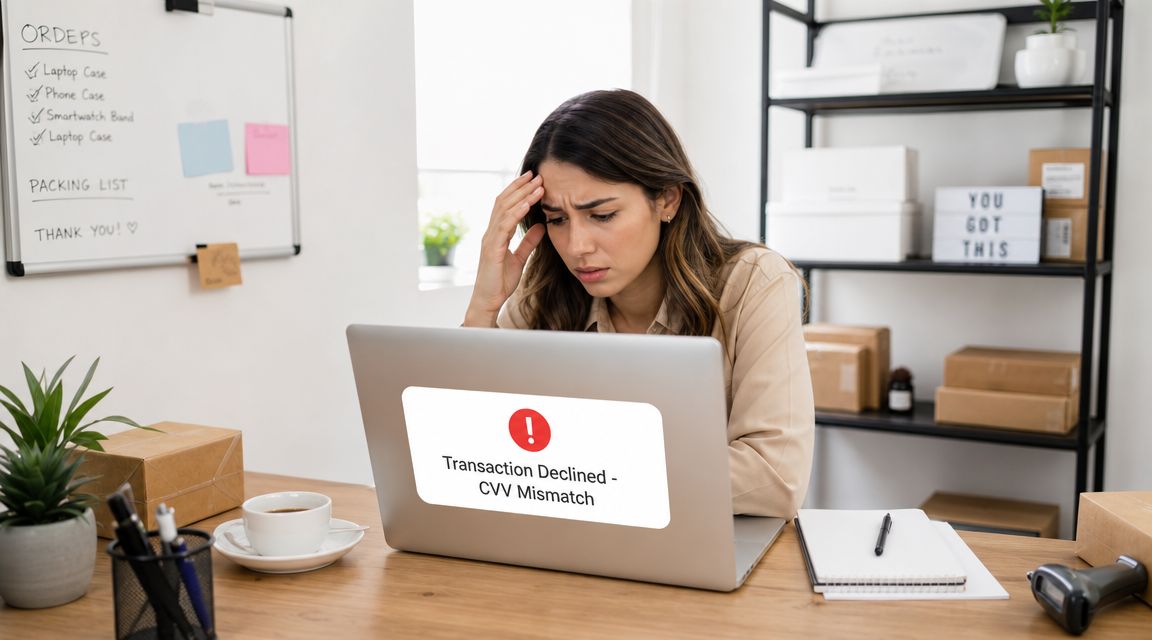
For a Shopify merchant, a CVV mismatch creates two immediate costs:
- Possible lost revenue: a real customer may have mistyped the code, used the wrong card, or gotten confused by the card layout.
- Possible fraud avoided: a criminal may have card details but not the physical card.
That split is why this topic matters so much. Security codes for Visa cards sit right in the middle of conversion and fraud prevention. If you treat CVV as optional, you open the door to preventable card-not-present abuse. If you treat every mismatch like a criminal attempt, you can kill good orders and annoy buyers who were ready to pay.
Practical rule: A CVV mismatch is not proof of fraud, but it is absolutely a reason to slow down and verify before you ship.
I've seen merchants make both mistakes. Some wave through mismatches because they don't want to lose revenue. Others auto-cancel too aggressively and create their own support mess. Neither approach is disciplined.
The better approach is operational. Use the CVV response as one checkout signal. Put it next to AVS results, order value, customer history, device signals, and fulfillment risk. Then make a clear call before the package leaves your warehouse.
What Exactly Is a Visa Security Code
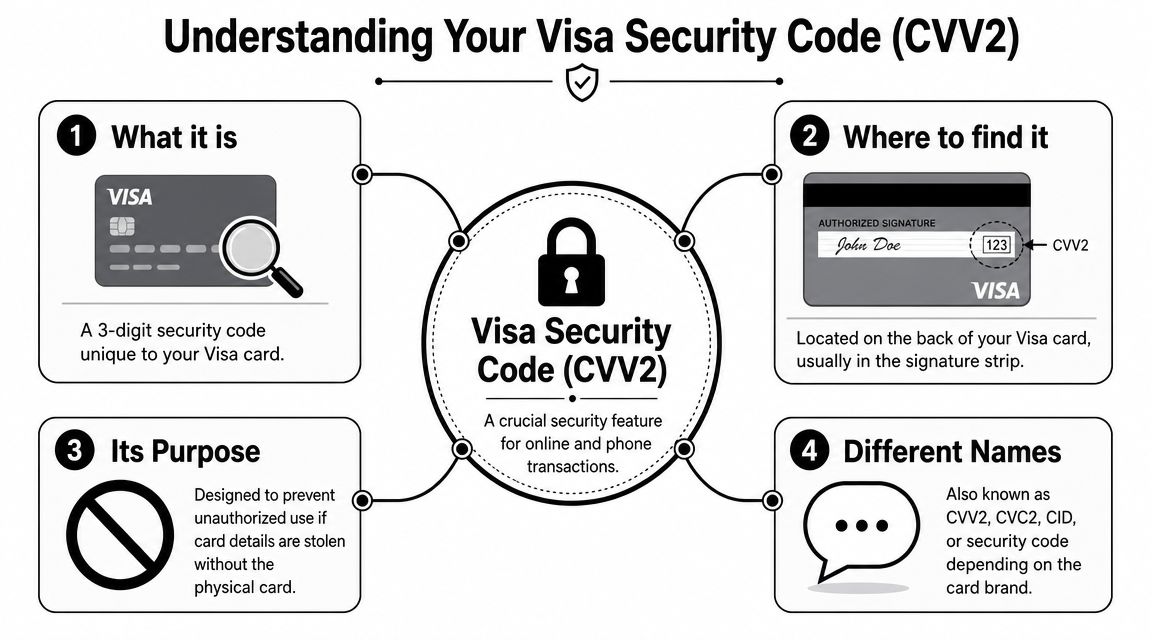
A Visa security code is historically known as CVV2, short for Card Verification Value 2. It's the 3-digit code printed on the back of the card, typically on the far right of the signature strip, and it's used mainly for online and phone orders where the card isn't physically swiped or chip-read, as described in this card security code overview.
What the code actually proves
The simplest way to think about CVV2 is this: it helps show that the buyer has the physical card in hand during a card-not-present transaction.
It is not the card number. It is not the expiration date. It is not a magic fraud blocker. It's a small verification step that makes stolen card data harder to use when the fraudster doesn't also have the card itself.
Visa's code was also printed flat rather than embossed, which made it harder to capture with older mechanical imprinting methods. That detail matters because the whole design was built around reducing fraud in situations where the merchant couldn't inspect the card directly.
Why merchants get confused
The naming is messy across payment networks. Visa uses CVV2. Mastercard uses CVC2. American Express uses CID and places a 4-digit code on the front rather than the back, while Visa, Mastercard, and Discover generally use a back-of-card format, as noted in this guide to card-not-present transactions.
That confusion shows up in your checkout every day. If your field label is vague, or your help text assumes every card looks the same, customers hesitate. Some enter the wrong digits. Some abandon the cart. Some open a support chat because they think your form is broken.
Use plain language in your checkout UI. Say what you want. If the field is for the card security code, label it that way and show a small visual hint. Don't assume the customer knows the term your gateway uses internally.
Ask for the code clearly, explain where to find it, and stop pretending shoppers care whether your processor calls it CVV2 or CVC2.
How to Use CVV Checks to Block Fraud at Checkout
A CVV check works fast, but the operational details matter. If your setup is sloppy, you create friction without getting the fraud protection you wanted.
What happens during the check
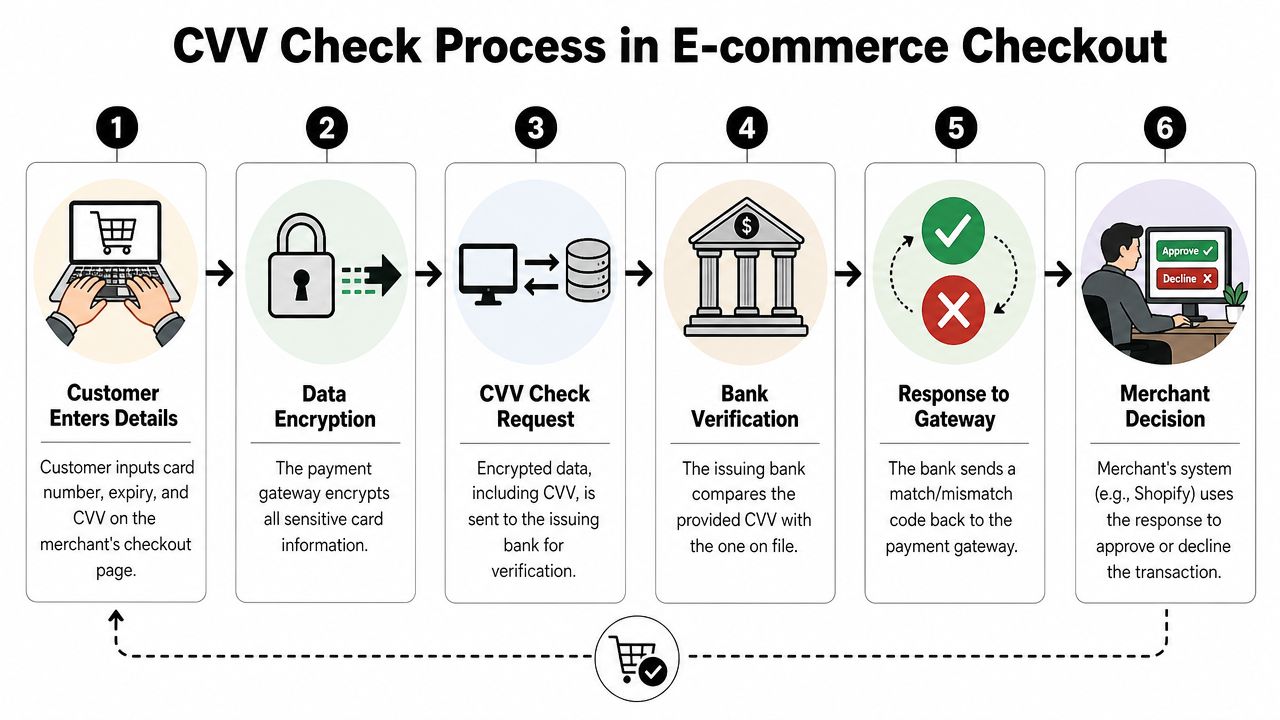
The customer enters card number, expiry date, and the Visa security code at checkout. Your payment gateway sends that information for authorization, and the issuer returns a match or mismatch response for the CVV field.
That response should drive action on your side. Not blind panic. Action.
A quick visual helps if you need to explain the flow to your team:
The rule you cannot ignore
The CVV2 is an authorization-time control, and merchants are strictly prohibited from storing security code data after authorization under payment card rules, as explained in this overview of Visa security features and fraud prevention strategies.
That means:
- Don't save it in Shopify notes: if staff copy and paste customer payment details into admin notes, that's a compliance problem.
- Don't keep it in CRM records: sales reps and support agents should never ask to store it for later use.
- Don't log it in custom apps: if you've added scripts, forms, or middleware, make sure they aren't capturing the code.
If your store has subscription or repeat-order flows, build them around tokenized payment methods from your processor. Don't invent workarounds.
What you should do in Shopify
Here's the no-nonsense version:
- Require CVV at checkout for card-not-present orders. If you're selling online, this should be standard.
- Add a short help prompt near the field so customers know where to find the code on different card brands.
- Review mismatch responses before fulfillment on any order that also has other risk signals.
- Pair CVV with address checks using tools like AVS address verification, because one signal alone is too thin.
- Use gateway and Shopify fraud controls to flag, hold, or cancel orders that fail your rules.
A mismatch doesn't always mean decline immediately. For low-risk orders with a returning customer, you might request a retry. For expensive rush shipments, mismatched CVV should push the order into manual review or straight cancellation.
| Scenario | Better move |
|---|---|
| Returning customer, normal order, CVV mismatch | Ask customer to retry payment |
| New customer, high-value order, mismatch plus other red flags | Hold or cancel |
| Digital goods or fast fulfillment | Review before delivery is released |
Your job isn't to maximize approvals at all costs. It's to protect contribution margin after fraud, support time, replacement costs, and disputes.
Your Chargeback Risk and The Limits of CVV
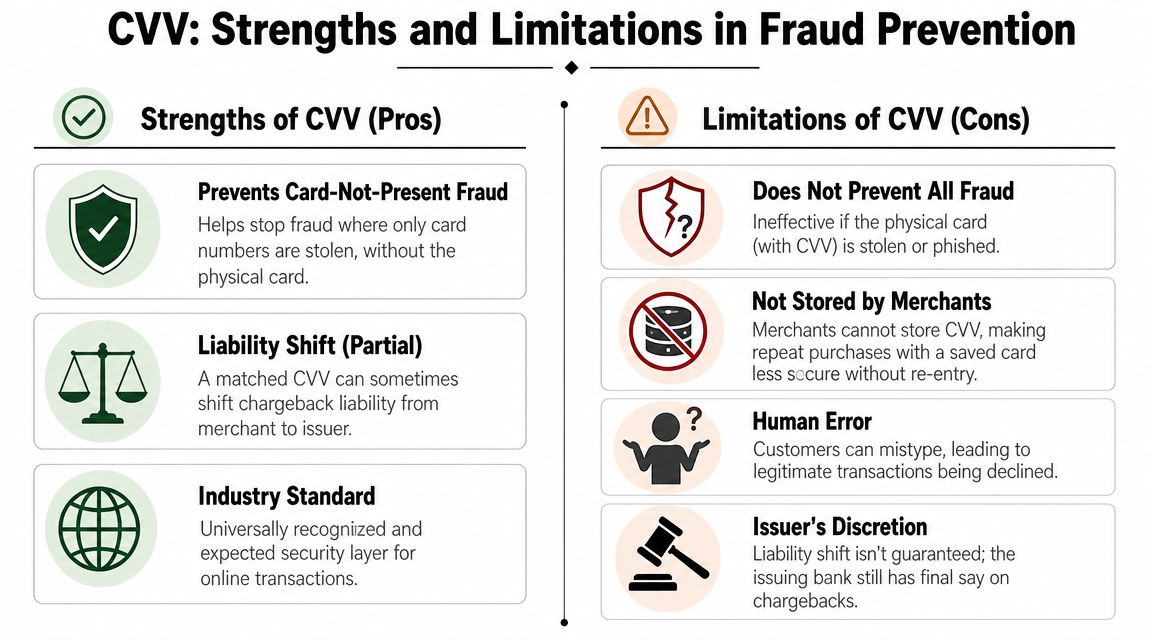
You approve an order, the CVV matches, the package ships, and two weeks later the bank pulls the money back. That is the operational reality for Shopify merchants. A CVV match helps, but it does not protect your margin on its own.
What CVV helps with
CVV is still worth requiring because it filters out low-effort fraud. It stops some card testing and some stolen-card attempts before they turn into fulfillment costs, support work, and preventable disputes.
It also gives you one more useful data point.
If an order turns into a chargeback, a successful CVV response can strengthen your evidence package. That matters, especially when you need to show the issuer the transaction passed basic cardholder verification at checkout.
Where CVV stops being enough
CVV does not solve friendly fraud, buyer's remorse, or recognition problems. A real cardholder can enter the correct code, receive the product, then dispute the charge anyway.
That is why merchants get misled by approval rates. A transaction can look clean at checkout and still become unprofitable later.
As Bankrate's explanation of card security codes explains, the code is only one verification step. It does not prove satisfaction, authorization beyond dispute, or that the customer will come to you before going to the bank.
A matched CVV helps your case. It does not win the case by itself.
What layered defense looks like
Profitable stores treat CVV as one checkpoint inside a tighter fraud and dispute process.
Use a mix of controls:
- Checkout screening: CVV, AVS, velocity rules, and selective 3-D Secure authentication for higher-risk orders
- Order-level review: customer history, product risk, shipping method, destination, and fulfillment timing
- Post-purchase records: tracking, delivery confirmation, support conversations, and clear order documentation
That layered setup protects more than fraud rate. It protects conversion efficiency too. If you force heavy friction on every shopper, you lose good orders. If you let every approved order flow straight to fulfillment, you absorb more chargebacks, more support load, and more wasted ad spend. The right setup is selective, not blunt.
For merchants evaluating smarter screening, Cleffex on AI in fintech security gives a useful overview of how pattern detection can catch orders that simple rule checks miss.
What to do when the dispute still lands
Build your response around the full transaction story, not the CVV result alone.
Use evidence such as:
- Order confirmation records
- Fulfillment and tracking details
- Customer service messages
- Device or behavioral risk signals from your stack
- CVV and other authorization results
Speed matters here. If your team is chasing screenshots, digging through inboxes, and assembling evidence by hand, you will miss deadlines and submit weaker responses. ChargePay handles chargeback workflow and representment submissions for Shopify merchants, with a focus on friendly fraud cases and response deadlines.
Handling CVV Edge Cases and Customer Questions
A lot of merchants lose easy revenue. Not because fraud became complex, but because the checkout experience got confusing.
When customers say they can't find the code
Terminology causes more problems than merchants expect. Visa uses CVV2, Mastercard uses CVC2, and American Express uses CID. Card layouts also vary, and unclear labeling can trigger avoidable declines, support tickets, and cart abandonment, as explained in this APA guide on card security code terminology and layouts.
Your fix is simple. Update the field label and helper text.
Use wording like this:
- Card security code: include a small note that Visa and Mastercard usually show it on the back
- AmEx help text: mention that American Express uses a front-side code
- Visual tooltip: show a card image instead of making customers guess
When the code is unreadable
Don't bypass the check. Don't ask the customer to send a photo of the card. Don't tell support staff to process it manually.
Tell the customer to contact the card issuer and use a different payment method if needed. If the code can't be read, that is the bank's problem to solve, not yours.
If a shopper can't provide the card security code, you shouldn't lower your standards to save the sale.
How recurring payments work without stored CVV
This confuses merchants because the rule sounds contradictory. You can't store CVV, but subscriptions still renew.
The answer is tokenization and the initial payment authorization flow through your processor. The recurring charge relies on the stored payment credential token, not a saved CVV sitting in your system.
That means two things:
- Your recurring setup should come from your payment provider's approved flow.
- Your team should never ask a customer to email or message their code for future billing.
If your staff needs a refresher on network authentication language, what SecureCode means in payment verification is a useful reference point for the broader card-authentication conversation.
A support script that actually helps
Keep your reply short and calm:
| Customer issue | Better support response |
|---|---|
| “Where is the security code?” | Explain location by card brand and point to the checkout visual |
| “Why was my payment declined?” | Ask them to recheck card number, expiry, billing address, and security code |
| “Can I give you the code another way?” | No. Direct them to retry securely through checkout |
Good fraud prevention is partly a support job. If your team gives inconsistent answers, you'll create confusion and more failed payments than the fraud tools ever would.
Turn Chargebacks Into a Solved Problem
A passed CVV check does not protect your revenue after a dispute lands in Shopify. It only tells you the buyer had the card details at checkout. Once the issuer opens a case, you still need to prove the order was legitimate and respond fast enough to keep the money.
That is where a lot of stores leak profit.
Every chargeback hits more than sales. You lose product, shipping, support time, review time, and often the chance to resell that inventory. If your team is handling disputes by hand, the full cost shows up in missed deadlines, inconsistent evidence, and staff getting pulled away from fulfillment and customer service.
Fix the operation, not just the checkout rule.
Build a repeatable process for collecting order evidence, storing customer communication, and answering disputes on time. If you need a practical framework, review this guide to chargeback representment for Shopify merchants. The goal is simple: every case should move through the same workflow, with the same evidence standards, every time.
ChargePay is one option for merchants who do not want to build that system in-house. It automates dispute handling, helps submit evidence on time, and reduces the manual work that turns chargebacks into a margin problem.
If CVV mismatches, friendly fraud, and chargebacks are draining your store, install ChargePay from the Shopify App Store. It helps Shopify merchants automate dispute handling, submit evidence on time, and recover revenue without building an in-house chargeback team.


.svg)



.svg)


.svg)
.svg)
.svg)