

A fraud chargeback hits your Shopify store. You refund it, blacklist the customer details, and move on. Then another order shows up a few days later with a different name, different shipping address, and different card. It still feels familiar.
That's often the problem. Fraudsters can swap emails, cards, and addresses fast. Swapping the actual phone or laptop they use is harder.
That's where device fingerprinting matters. If you've been asking what is device fingerprinting, the short answer is this: it helps you recognize the device behind the order, even when the person using it changes the obvious details. For stores dealing with repeat fraud, bot traffic, and chargebacks, that can save real money and stop the same abuser from cycling back in.
Why You Keep Losing to the Same Fraudsters
A lot of repeat fraud looks “new” if you only check the surface details.
One order comes from Sarah at one address. The next comes from Mike at another address. The card numbers are different. The emails don't match. If you're reviewing orders manually, those transactions can look unrelated, especially when the fraudster is careful.
Fake identities are cheap. New devices are not.
Fraudsters routinely rotate the easy stuff:
- Email addresses that take seconds to create
- Shipping destinations that can be changed or rerouted
- Payment credentials that may already be stolen or short-lived
- Customer accounts opened just for one transaction
What usually stays more consistent is the machine they use to place those orders.
That matters because repeat abuse is common in patterns like account testing, reshipping fraud, and bust-out fraud on Shopify. The visible identity changes, but the underlying device often leaves behind familiar technical traces.
Practical rule: If the customer identity keeps changing but the buying behavior feels identical, stop treating each order as an isolated event.
Why this hurts your bottom line
Every missed connection costs you more than the product.
You can lose inventory, shipping spend, payment processing fees, and the time your team burns reviewing disputes. Then the chargeback lands, and you're left trying to explain to the bank what happened after the fraud already succeeded.
Device fingerprinting gives merchants another layer of memory. Instead of asking, “Have I seen this cardholder before?” you can ask, “Have I seen this device before, and what happened last time?” That shift is why it has become such a useful fraud signal.
It doesn't solve chargebacks by itself. But it helps you spot the serial abuser who keeps returning in a new disguise.
Your Customer's Digital Fingerprint Explained
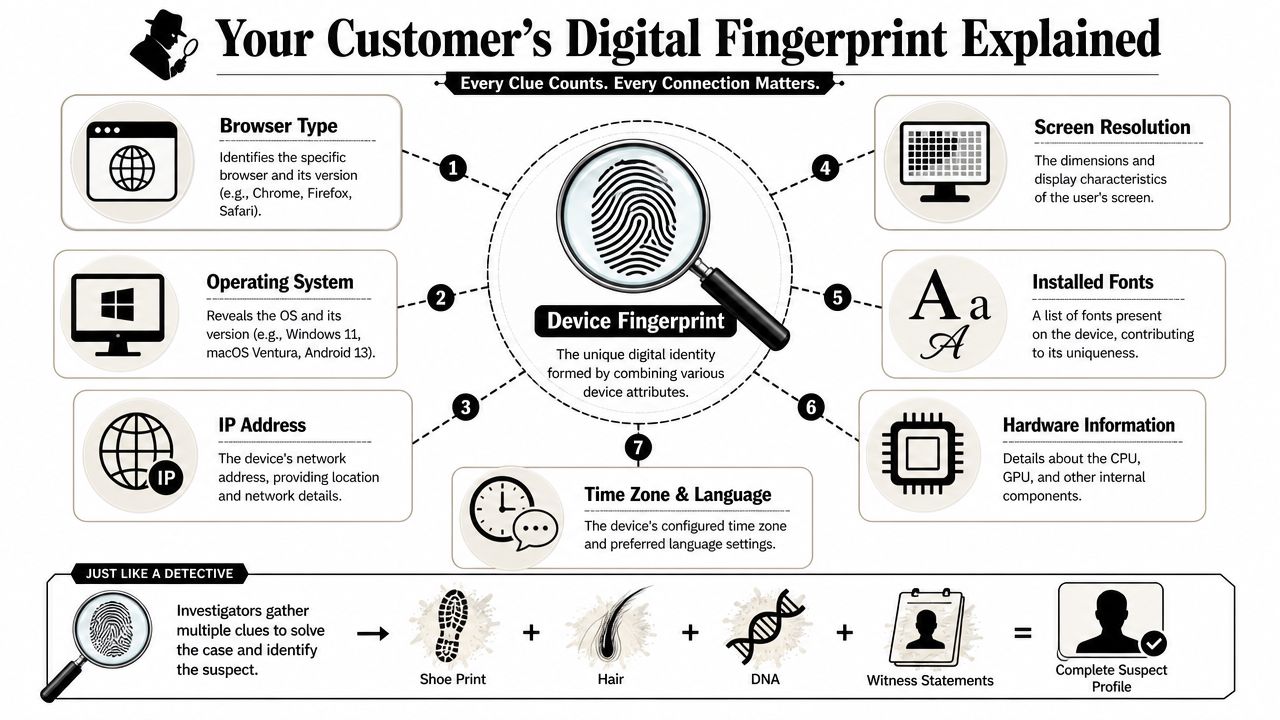
Think like a detective for a minute. One clue rarely solves the case. A shoe size alone tells you almost nothing. Add clothing fibers, location, time, and witness details, and a profile starts to form.
A device fingerprint works the same way. It combines many small technical clues from a phone, laptop, or browser into one profile that helps your systems recognize that device later.
What goes into the fingerprint
A fingerprint can include signals such as:
- Operating system like Windows, macOS, Android, or iOS
- Browser details such as Chrome, Safari, or Firefox and their versions
- Screen settings including resolution and display traits
- Language and time zone configured on the device
- Installed fonts or plugins that add more distinction
- HTTP headers sent with web requests
No single signal is special on its own. Plenty of your customers use the same browser or the same phone model. The value comes from the combination.
According to a Spanish data-protection survey on device fingerprinting, there are about 4 billion computers, smartphones, and other terminal devices worldwide, and with enough discriminating data points, nearly all of them can be uniquely identified.
Why merchants get confused about uniqueness
This is the part that trips people up.
When people hear “fingerprint,” they assume there's one permanent, perfect ID attached to every device. That's not really how it works. A device fingerprint is more like a very detailed profile built from many clues observed together.
Here's a simple way to understand it:
| Clue | By itself | Combined with others |
|---|---|---|
| Browser type | Common | More useful |
| Screen resolution | Common | More useful |
| Time zone | Common | More useful |
| Fonts and hardware traits | Sometimes distinctive | Much more useful |
That's why merchants using transaction monitoring for Shopify orders care about pattern matching, not single data points.
A MacBook using Chrome in English isn't memorable. A MacBook using a specific Chrome version, a specific screen setup, a certain font list, time zone, and hardware behavior becomes much easier to recognize.
Why it matters more than cookies
Cookies are easy to delete. Privacy settings can block them. Some browsers restrict them heavily.
Device fingerprinting matters because it can still help identify or partially identify a device when persistent cookies aren't available. One widely cited browser fingerprinting milestone, canvas fingerprinting, was shown to add 5.7 bits of entropy, which helps explain why even one fingerprinting method can contribute measurable uniqueness to a device profile, as noted in the device fingerprint overview.
For a Shopify merchant, the takeaway is simple. If a fraudster clears cookies and comes back, that doesn't necessarily make them invisible.
The Tech Behind Building a Digital Identity
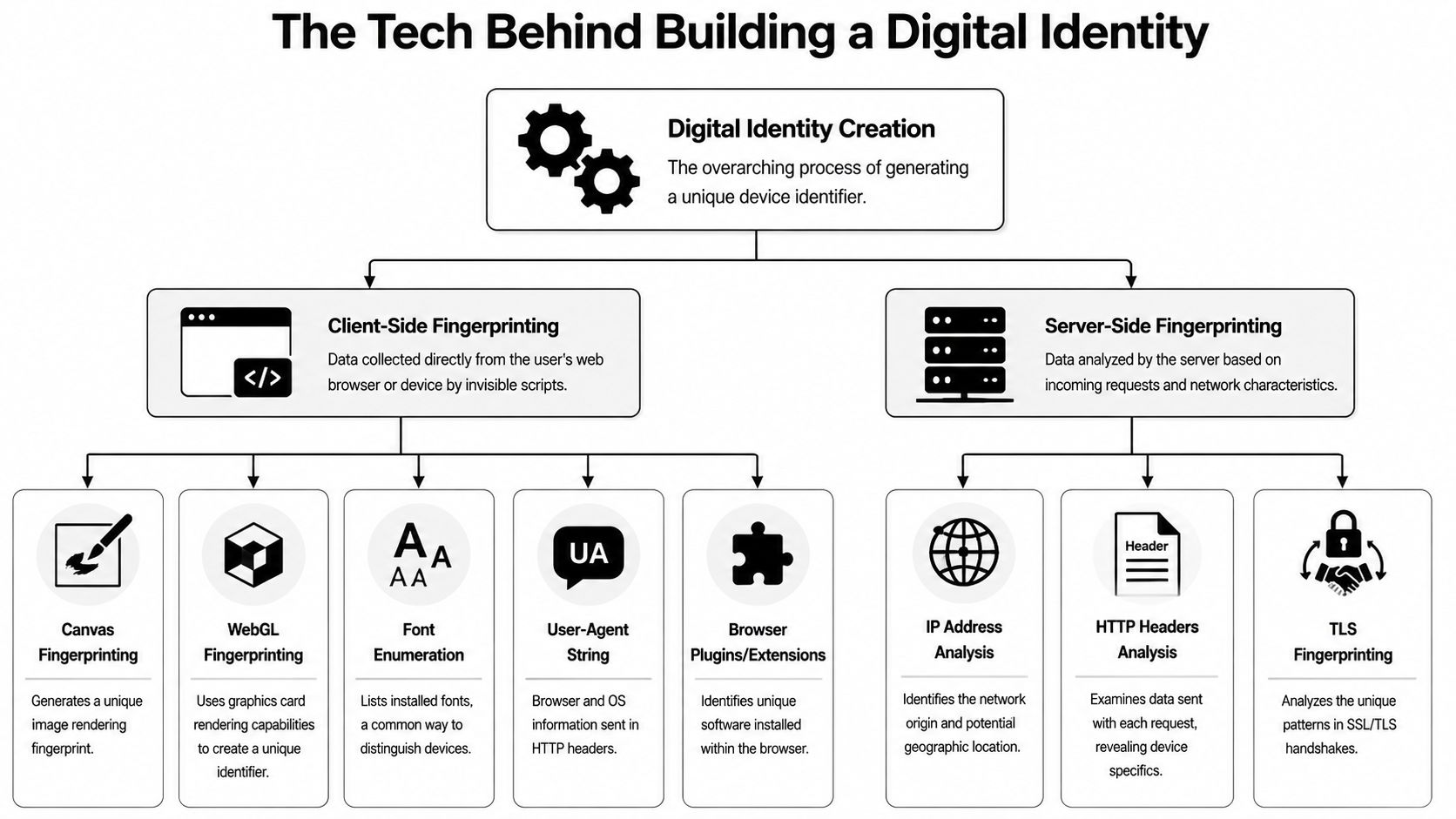
You don't need to write code to understand how a fingerprint gets built. The easiest way to break it down is into two buckets: what the browser reveals directly, and what your server can observe when the request reaches your store.
Client-side signals
Client-side fingerprinting happens in the visitor's browser. A script runs in the background and collects technical traits the browser exposes.
That can include browser version, screen size, language settings, installed fonts, and behavior from browser features that interact with graphics or audio.
A good example is canvas fingerprinting. The browser is asked to draw an invisible image. Because graphics hardware, drivers, and software stacks vary, devices can render that image slightly differently. Those tiny differences become another clue in the fingerprint.
Server-side signals
Server-side fingerprinting uses what your server already sees during a visit or checkout attempt.
That can include request headers, network-related traits, and how the connection behaves when the device talks to your site. These signals don't depend on one visible identifier. They're part of the broader pattern.
Why the whole is stronger than the parts
The most important technical idea is that device fingerprinting is a signal-fusion problem. Systems combine many low-entropy attributes into a single composite identifier. The WorkOS guide to device fingerprinting describes this as combining signals like browser headers, screen resolution, language and time zone, fonts and plugins, WebGL behavior, AudioContext behavior, and network traits so the overall profile becomes more discriminative than any one signal alone.
That's why modern implementations often add harder-to-tamper signals such as WebGL rendering and AudioContext behavior. They help make spoofing harder.
Most merchants look for one smoking gun. Fingerprinting works because it doesn't rely on one.
What happens after collection
All those signals usually get normalized and turned into a stored identifier, often as a hash. That means the system can compare a new visit against prior visits without treating every raw signal as a separate manual check.
The practical flow looks like this:
- A shopper lands on your store and starts browsing or checking out.
- Signals are collected from the browser and request environment.
- The system combines them into one composite profile.
- A hash is stored so future visits can be compared quickly.
- Risk rules use the match result to decide whether to approve, review, or challenge the order.
What this means for a Shopify store owner
You don't need to inspect WebGL output or parse headers yourself. What matters is understanding what the tool is doing.
It isn't “seeing the customer's real identity.” It's recognizing a device by the pattern of technical evidence that device leaves behind. That distinction matters because it explains both the power and the limits of the method.
If your team treats the fingerprint like a permanent passport, you'll overtrust it. If you treat it like a strong fraud signal built from many clues, you'll use it correctly.
How Fingerprinting Unmasks Serial Abusers and Bots
At this point, device fingerprinting stops sounding technical and starts sounding useful.
The reason merchants care about it is simple. Fraud rarely happens once. The same person often comes back, tests your defenses, and tries again under a fresh identity.
Serial chargeback abuse
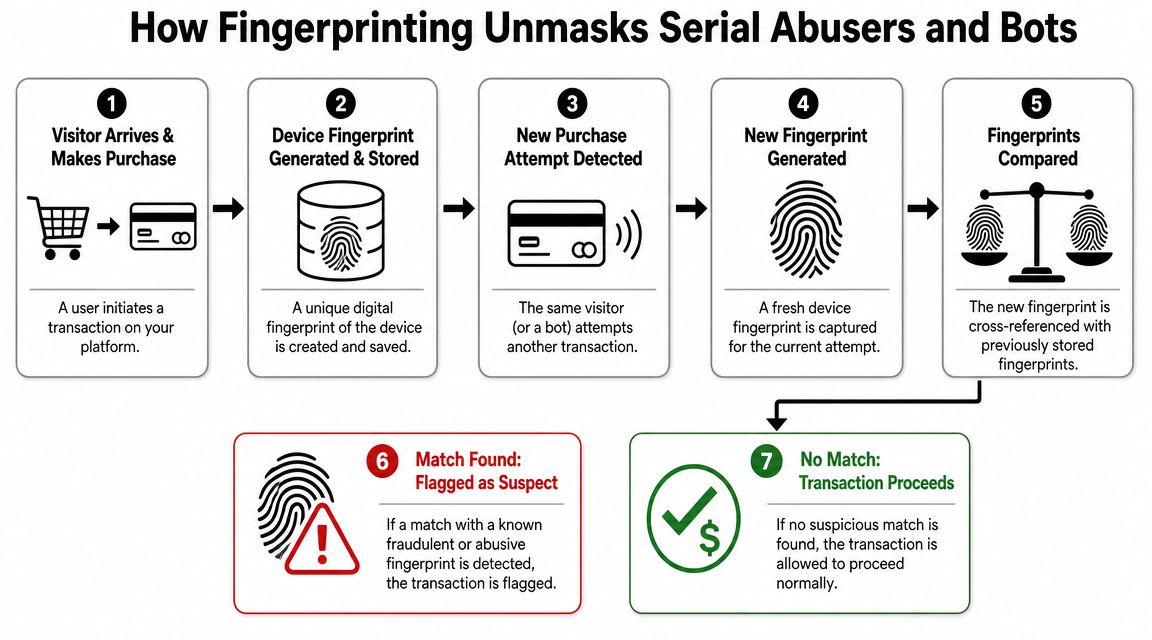
Say someone places an order with a stolen card. Later, the transaction turns into a chargeback. You block the email, card details, and shipping info.
A day later, a new order comes in. Different identity. Same laptop.
If you only look at customer fields, you miss the connection. If your fraud stack compares the new fingerprint to previously seen risky devices, the order can be flagged before fulfillment.
The anti-fraud value is cross-session device recognition. A stored fingerprint hash can help determine whether a login or payment attempt comes from a known device or a new one, even when cookies are cleared or IP addresses change, as explained in this overview of device fingerprinting for anti-fraud workflows.
Account takeover attempts
A real customer's account gets compromised. The fraudster logs in using valid credentials, so the password itself doesn't raise alarms.
What changes is the device context.
If the account normally logs in from one familiar set of devices and suddenly a new device appears with suspicious behavior, your store can add friction. That might mean a step-up authentication prompt, manual review, or delaying fulfillment until the order clears more checks.
Bots and scripted attacks
Bots are noisy, but not always in obvious ways. Some are built to look human enough to bypass simple defenses.
Fingerprinting helps because repeated automated traffic often carries recurring technical patterns. A bot operator can rotate emails and proxies, but their browser automation setup may still produce recognizable traits over multiple sessions.
If you want a broader view of how bad actors gather and recycle data before those attacks happen, this piece on exploring social media data extraction is useful context. It shows how data collection and abuse often connect upstream, before the checkout fraud ever appears in your store.
Here's the practical decision logic many merchants use:
- Known good device. Let the order move with minimal friction.
- Known bad device. Block, cancel, or route to review.
- Unknown device with suspicious signals. Add checks before shipment.
- Partial match to prior abuse. Investigate instead of auto-approving.
Later in the process, many stores also pair this with blacklist and scammer blocking workflows for Shopify so repeat bad actors don't keep slipping through under new names.
A quick visual example helps:
When fraudsters change identities faster than your team can track them, device recognition gives you continuity.
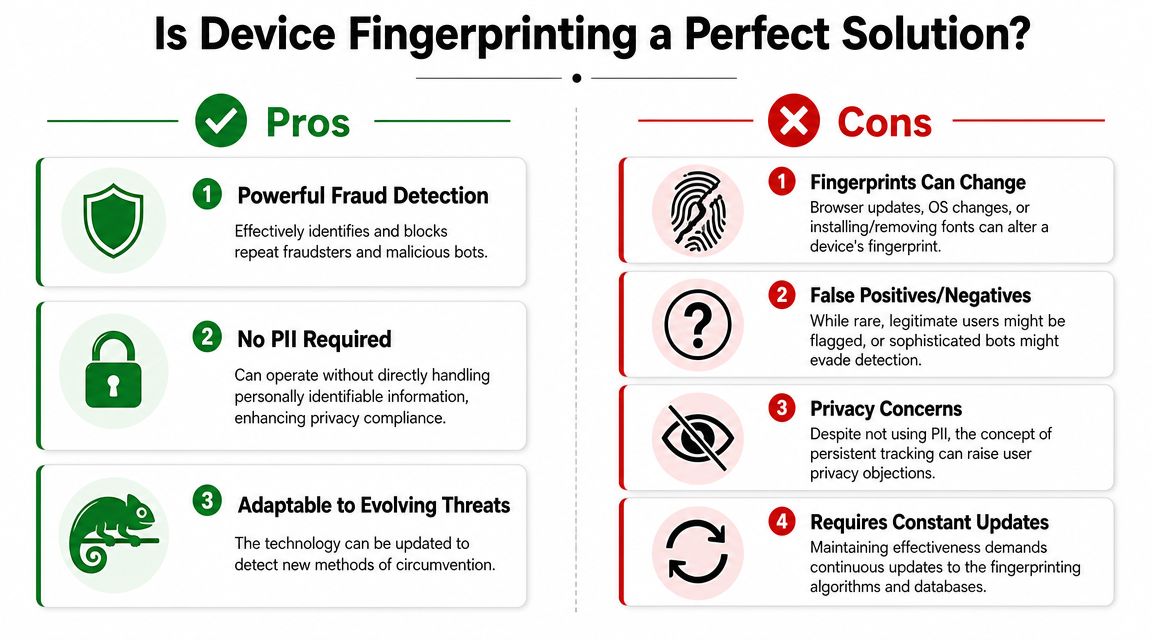
Is Device Fingerprinting a Perfect Solution
No. And if a vendor presents it as a magic answer, be careful.
Device fingerprinting is powerful, but it's not a permanent truth machine. It's one signal in a larger fraud decision.
Why fingerprints change
The same device can produce a different fingerprint after routine changes.
A browser update can affect the output. An operating system patch can alter exposed traits. A VPN can change the network context. Even privacy-focused browser behavior can reduce consistency.
That's why device fingerprinting is better treated as a probabilistic signal, not a fixed identity. The Sumsub explanation of device fingerprinting makes this point clearly: routine changes like browser updates, OS patches, or VPN use can alter the fingerprint, which is why fraud systems use it as one signal among many rather than a guaranteed source of truth.
What can go wrong in practice
There are two common mistakes merchants make.
The first is overblocking. A good customer gets a new phone, updates Safari, or shops while traveling. Their fingerprint looks unfamiliar, and the merchant declines the order too quickly.
The second is overtrusting. A merchant sees a partial device match and assumes it proves the customer is the same person. It doesn't. It proves the technical profile looks related enough to deserve attention.
A more realistic view looks like this:
| Question | Better answer |
|---|---|
| Does a fingerprint identify a person? | Not directly |
| Can it help recognize a device across visits? | Yes, often |
| Can it change over time? | Yes |
| Should it be the only decline reason? | No |
Use device fingerprinting to raise or lower confidence. Don't use it as your only judge.
The privacy and compliance tradeoff
This is the other issue many simple guides skip.
A fraud-prevention use case is different from using fingerprinting for ad tracking. That distinction matters because regulators and browser vendors continue to scrutinize tracking methods that identify users without traditional identifiers.
For merchants, the practical questions are straightforward:
- Purpose. Are you using it for fraud prevention or for broader tracking?
- Disclosure. Does your privacy policy explain the practice clearly?
- Scope. Are you collecting only what you need for security?
- Governance. Who on your team owns the decision if a customer questions it?
This same balancing act comes up with related controls like 3D Secure authentication on Shopify. More security can reduce fraud, but too much friction can hurt conversions and customer trust.
The right mindset
Treat device fingerprinting like a skilled investigator, not a judge.
It can connect visits, expose repeated abuse, and strengthen your order review process. But it still works best when combined with other evidence such as order value, shipping mismatch, velocity, account history, and post-purchase dispute patterns.
That's how experienced fraud teams use it. Not as certainty. As context.
Your Action Plan for Smarter Fraud Prevention
Most Shopify merchants don't need another dashboard full of cryptic device IDs. They need fewer bad orders shipped, fewer chargebacks lost, and less staff time wasted on review work.
The best use of device fingerprinting is inside a broader fraud system that makes decisions in context.
What a practical setup looks like
A useful stack combines device intelligence with other signals, such as:
- Checkout risk signals like address mismatch or unusual order patterns
- Velocity checks that catch repeated attempts in a short window
- Account context such as whether the device has been seen before
- Dispute evidence workflows that preserve useful order history when a chargeback arrives
If you rely on fingerprinting alone, you'll either block too much or miss too much. If you combine it with layered controls, you get a smarter filter.
Keep policy in the loop
Implementation isn't just technical. It's also policy-sensitive.
The Plaid resource on device fingerprinting and compliance tradeoffs notes that while fingerprinting can be a strong anti-fraud tool, regulators and browser vendors continue to scrutinize tracking methods. For a merchant, that means your approach needs to balance security needs with legal risk.
A simple checklist helps:
- Confirm the purpose is fraud prevention, not broad customer tracking.
- Document the workflow for how risk decisions are made.
- Update your privacy policy so the practice isn't hidden.
- Use layered review rules instead of auto-declining from one signal.
- Connect prevention with disputes so useful evidence isn't lost later.
For many stores, the bigger win comes from tying fraud controls to chargeback operations. Prevent what you can. Then make sure you can still fight the cases that get through. If you want the bigger picture, this guide to ecommerce chargeback protection is a good next read.
Chargebacks don't wait for your team to become fraud experts. ChargePay helps Shopify merchants fight back with 92.4% win rate, 200K+ disputes handled, and $10.8M+ recovered. It has a 4.9-star rating on the Shopify App Store and a Built for Shopify badge. If you're losing revenue to fraud, friendly fraud, and weak dispute responses, install ChargePay from the Shopify App Store and let it handle the dispute work for you.


.svg)



.svg)


.svg)
.svg)
.svg)