

You check your Shopify payouts, spot a failed bank payment, and see a code that tells you almost nothing: R16. That's the kind of error that wastes time fast. You're trying to figure out whether this is a simple retry, a customer issue, or the start of a bigger mess that ends in a dispute.
It's the third one.
The r16 ach return code means the customer's bank account is frozen, so the bank won't allow the ACH debit to go through. No money moves. No retry trick fixes it. And if you keep billing that account, you're not solving the problem. You're stacking operational risk, customer frustration, and possible chargeback exposure.
That Sinking Feeling a Failed ACH Payment
When you see an R16 in your payment reports, treat it like a hard stop. This isn't the same as a customer being short on funds for a day or two. The account itself is restricted, which means your debit failed because the customer's bank blocked access to the account.
For a Shopify merchant, that matters for one reason above all others. Failed payments often become customer service problems, and customer service problems often become disputes. If a subscription keeps trying to bill a frozen account, the customer may assume you ignored their situation or kept charging after a failure. That's how a back-office payment issue turns into lost inventory, refund demands, and chargebacks.
There's also a cost to doing nothing. Your team spends time chasing a payment that won't settle, updating customers manually, and cleaning up failed rebills. If you already deal with ACH failures, ChargePay's guide to ACH return charges and merchant impact is worth reading because these errors rarely stay isolated.
Practical rule: The moment you see R16, stop thinking “retry” and start thinking “containment.”
That means pausing future attempts, getting the customer on an alternate payment method, and preserving your records in case the failed payment leads to a later dispute. Speed matters here because confusion compounds quickly when subscriptions, reorder flows, or delayed fulfillment are involved.
What the R16 Code Actually Means
R16 is the ACH return code for Account Frozen/Entry Returned per OFAC Instruction. For a Shopify merchant, the plain takeaway is simple. The customer's bank blocked the debit because the account cannot be used right now.
That is not a billing glitch. It is a stop sign from the bank.
Your processor sends the ACH debit. The customer's bank reviews it and rejects it because access to that account is restricted. That restriction can come from an account freeze or an OFAC-related instruction. Either way, you should treat the payment as blocked until the customer resolves the issue with their bank.
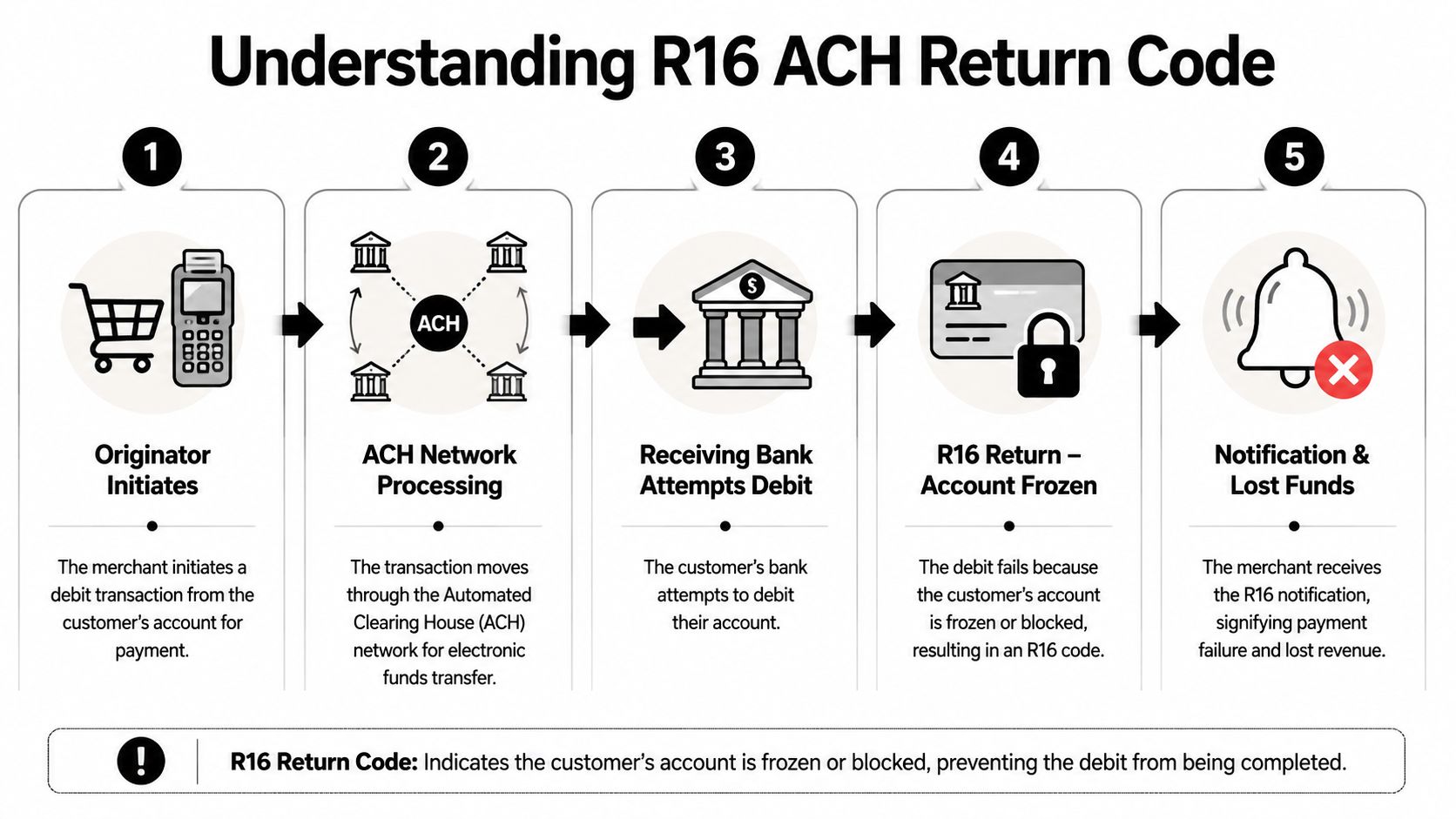
What happens behind the scenes
A few details matter because they change how you should respond:
- Official definition: R16 means “Account Frozen/Entry Returned per OFAC Instruction”, as summarized by GetTRX's explanation of the R16 ACH return code.
- Timing: The return is handled quickly. You are usually dealing with a confirmed bank refusal, not a vague delay that might clear on its own.
- Operational impact: Processing stops at the bank level. This is why repeated retries are a bad call and why your team should shift to customer outreach right away.
- Planned rule update: Nacha has announced a rule change, scheduled to take effect on March 17, 2028, that would split the current meaning so R16 becomes “Account Frozen” and R90 covers sanctions-related returns.
Why merchants misread it
Store owners often lump R16 in with other ACH failures and assume another attempt will fix it. That assumption costs money.
R16 points to an account restriction, not a temporary funds issue. If you keep rebilling a frozen account, you raise the odds of customer confusion, angry support tickets, and later payment disputes. If you need the plain-English distinction, ChargePay's guide to what a return item chargeback means explains why an ACH return can still create chargeback risk after the original debit fails.
R16 means the bank has blocked that account. Pause the debit path, contact the customer, and get a new payment method on file.
Why Your Customers Account Was Frozen
You see R16 on a Shopify payout report, the order is already in motion, and now you have a bigger problem than one failed debit. The customer's bank froze the account, which means your ACH path is dead for now and the risk of a later dispute just went up.
Banks freeze accounts for a small set of serious reasons. Your job is not to guess which one with perfect accuracy. Your job is to treat the account as blocked, protect the order, and stop your team from creating more exposure.
Bank risk and fraud controls
A bank may freeze the account because its fraud systems caught something unusual. That could be suspicious transaction activity, signs of account takeover, or a pattern that triggered a manual review. For a Shopify merchant, this matters immediately. A customer dealing with a frozen account is more likely to miss your outreach, dispute the order later, or claim they never approved the debit.
Treat fraud-related freezes as both a payment failure and a customer communication problem. If your team needs a better checklist for evidence and order notes, use ChargePay's guide to bank fraud investigations and what merchants should document.
Legal holds and court action
Some freezes come from legal action. Banks can restrict an account because of garnishments, court orders, or other legal holds. If that is the reason, your debit was blocked because the entire account is restricted, not because your billing setup was wrong.
This is why retry logic fails here. The customer cannot fix this from your checkout page, and your billing software cannot push through a legal hold.
Compliance and sanctions screening
R16 can also appear when the bank stops the transaction for compliance reasons tied to OFAC screening. As noted earlier, the code itself includes that language. You should not try to interpret the compliance issue yourself or explain it to the customer in speculative terms.
Keep your message simple. Tell the customer their bank did not approve the ACH payment and ask for a different payment method. Do not mention sanctions, legal action, or fraud unless your processor or bank gives you specific instructions.
What matters most: The cause might be fraud controls, a legal restriction, or compliance screening. In every case, the account is unusable for ACH until the customer resolves it with their bank.
For Shopify stores, the practical recommendation is simple. Remove that bank account from any active subscription, preorder balance collection, or installment schedule right away. If you leave it in place, you increase the chance of repeated failures, confused customers, and chargebacks tied to the same order after the original ACH return.
Your Immediate Action Plan for an R16 Return
When R16 hits, don't overthink it. Your response should be fast, consistent, and documented. Most merchants lose money here because they hesitate, retry blindly, or send vague emails that confuse the customer.
The three moves to make right away
Pause every future ACH attempt on that account
Stop recurring billing, queued debits, subscription renewals, and any manual rebill your team planned to run. If the account is frozen, more attempts won't help. They only create more failures and more friction.Reach out to the customer within the same day
Direct outreach is your best recovery tool. According to processor benchmarks summarized by Nacha's sanctions-code update page, 92% of payment issues leading to codes like R16 can be resolved through direct recipient outreach within 48 hours. That makes customer communication the highest-value action you can take.Log the failure and save your evidence
Keep the return notice, timestamps, order details, internal billing notes, and every email or support message. If the customer later files a dispute, this record helps show you responded responsibly and stopped collection attempts after the failure.
Use a message that is calm and clear
Don't accuse the customer of fraud. Don't mention sanctions. Don't dump ACH jargon into the email. Just explain that the bank payment didn't go through and ask for a new payment method.
| Email Element | Example Text |
|---|---|
| Subject line | Payment issue with your recent order |
| Opening | Hi [First Name], we couldn't complete your recent bank payment for order [Order Number]. |
| Explanation | Your bank returned the payment, so we've paused any further bank debit attempts tied to this order. |
| Reassurance | No action has been taken on your account beyond pausing the failed payment method. |
| Request | Please reply to this email or update your payment method so we can complete your order or subscription without delay. |
| Alternate method prompt | If it's easier, we can help you switch to a different payment method today. |
| Support close | If you have questions, reply here and our team will help. |
Copy and send this
Hi [First Name], we tried to process your bank payment for order [Order Number], but your bank returned the transaction. We've paused further bank debit attempts for this account to avoid additional failures. Please reply with your preferred next step or update to an alternate payment method so we can complete your payment. If you need help, our support team can assist right away.
That message does three things well. It states the issue. It shows restraint. It creates a paper trail.
What not to do
- Don't retry automatically: R16 needs manual handling.
- Don't keep shipping blindly: Review whether the order should be held pending valid payment.
- Don't let support and finance work from different notes: One system of record matters here.
A merchant who contacts the customer quickly can often recover the order and avoid a dispute. A merchant who keeps rebilling a frozen account usually creates a second problem on top of the first.
How to Prevent R16 Returns and Protect Your Revenue
You can't control whether a customer's bank freezes their account. You can control how exposed your store is when it happens.
Build a stricter ACH workflow
The first upgrade is simple. Validate bank account status before you rely on ACH, especially for subscriptions, higher-ticket orders, or risky customer segments. If your processor offers account validation or status checks, turn them on. If it doesn't, that's a processor problem, not just a customer problem.
The second upgrade is operational. Separate your retry logic by return code. R16 should sit in its own bucket with a clear rule: manual review only.
R16 is a hard stop. Your system should treat it differently from a recoverable payment failure.
If you're building out that workflow, ChargePay's guide to transaction monitoring solutions for risk and payment operations is a practical place to start.
Follow the official rule
The guidance on this code is unusually direct. Slash's ACH guidance for R16 says “Do not reinitiate the entry” and instructs merchants to “contact the receiver for alternate payment methods or to confirm when account is un-frozen.” That's the right playbook.
So prevention here isn't about finding a clever retry sequence. It's about smarter routing, better alerts, and tighter communication. If ACH fails with R16, move the customer to another approved payment method and keep the order history clean. That protects cash flow and lowers the odds that a simple failed debit turns into a friendly fraud claim later.
Stop Losing Money to Payment Disputes with ChargePay
An R16 return is rarely just a payment ops annoyance. It's often the first sign that a customer account, order, or billing relationship is heading toward a bigger problem. That's exactly why dispute records, payment failures, and customer communication need to live in one clear workflow.
ChargePay is built for that reality. It's an AI-powered chargeback platform for Shopify merchants that handles the dispute lifecycle from alert to response. The numbers are straightforward: 92.4% win rate, 200K+ disputes handled, and $10.8M+ recovered. It also has a 4.9-star rating and a Built for Shopify badge.
If you're tightening fraud and payment operations more broadly, Sift AI's enterprise playbook is a useful resource on reputation and trust controls across the customer lifecycle. It pairs well with a more disciplined approach to post-payment dispute handling.
R16 matters because failed bank debits often become “I didn't authorize this,” “I never got help,” or “this merchant kept charging me” disputes later. When that happens, good records win cases. ChargePay helps merchants turn those records into strong evidence packages instead of scrambling at the last minute.
You can see the product in action here:
If your team is still handling disputes manually, you're burning time on work that should already be automated. ChargePay's product overview for Shopify merchants shows how the platform identifies friendly fraud, builds representment responses, and submits them before deadlines.
If you're tired of losing revenue to failed payments that turn into chargebacks, install ChargePay from the Shopify App Store. It's built for Shopify, rated 4.9 stars, and runs on a pay-per-win model, so you only pay when ChargePay recovers your money.


.svg)



.svg)


.svg)
.svg)
.svg)